- Home Page /
- Electronics /
- Computer Accessories /
- Computer Accessories & Peripherals /
- Keyboards, Mice & Accessories /
- Computer Keyboards /
- Microsoft Sculpt Ergonomic Keyboard for Busin...
0 ratings


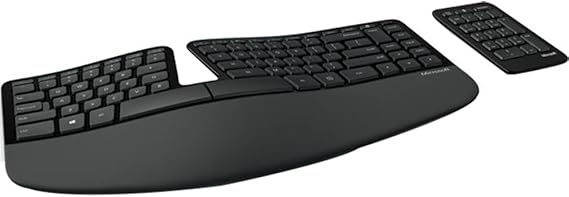
Microsoft Sculpt Ergonomic Keyboard for Business. Wireless , Comfortable, Ergonomic Keyboard with Split Design and Palm Rest. Separate Number Pad
0 ratings
Write a review
Out of stock
 Imported from USA store
Secured transaction
Ubuy works hard to protect your security and privacy. Our advanced payment security system ensures confidentiality by encrypting your information during transmission using AES (Advanced Encryption Standards) and SSL (Secure Socket Layer) protocols. Your payment details are 100% secure as we do not share your payment details with third party sellers.
Our Top Logistics Partners


The Sculpt Ergonomic Keyboard for Business has a uniquely modern design and an amazingly comfortable feel

Fast
Shipping

Free
Return*

Secure Packaging

100% Original Products

PCI DSS Compliance

ISO 27001 Certified


Note: Step 1 Voltage Transformer required for using electronics products of US store (110-120). Recommended power converters Buy Now.


What Stands Out
Ergonomic Design
The split keyboard layout promotes natural hand positioning, reducing wrist strain for increased comfort during extended typing sessions, making it ideal for professionals and gamers alike.
Wireless Convenience
Connects effortlessly via wireless technology, eliminating cable clutter and allowing flexible placement, enhancing workspace organization and reducing interruptions during use.
Separate Number Pad
The included detachable number pad offers customizable workspace layout options, facilitating easier data entry without compromising ergonomics and enhancing productivity.
Product Details
- Split keyset design promotes natural wrist and forearm position
- 2.4 GHz Radio Frequency for wireless connectivity
- Cushioned palm rest for wrist support and neutral position
- Domed keyboard design reduces wrist pronation
- Separate number pad for flexible workspace setup
- Natural arc key layout mimics curved shape of fingertips
| Package Weight | 16 Pound |
Who Should Buy?

-
Office Workers
Ideal for those who spend long hours at a desk, reducing strain on wrists and forearms.
-
Writers and Editors
Excellent for writers who need comfort while typing for extended periods, enhancing productivity and comfort.
-
Gamers
Beneficial for gamers who prefer an ergonomic setup to maintain comfort during long gameplay sessions.

-
Casual Users
Not suitable for casual users who occasionally use a keyboard and may prefer a standard layout.
-
Compact Workspaces
Less ideal for users with limited desk space due to its split design and separate number pad.
-
Budget Shoppers
Not recommended for users seeking a low-cost option, as it may be pricier compared to standard keyboards.
Product Description
Microsoft Sculpt Ergonomic Keyboard for Business. Wireless , Comfortable, Ergonomic Keyboard with Split Design and Palm Rest. Separate Number Pad Included
Have any Query? Chat with us
Customer Questions & Answers
-
Question:
What are the key features of the Microsoft Sculpt Ergonomic Keyboard for Business?
Answer: The Microsoft Sculpt Ergonomic Keyboard features a split design, comfortable palm rest, and a wireless setup. These features promote a natural hand, wrist, and forearm position, reducing the strain commonly associated with long typing sessions. The separate number pad allows for versatile desk arrangements, enabling users to position their keyboards in a way that suits their work styles. Ideal for both casual and professional use, it enhances productivity without compromising comfort, making it an excellent choice for long hours at the desk. -
Question:
Is the Microsoft Sculpt Ergonomic Keyboard compatible with Mac and Windows?
Answer: Yes, the Microsoft Sculpt Ergonomic Keyboard is exclusively compatible with Windows and can function on Mac systems with limited features. Nevertheless, it is optimized for Windows, ensuring all shortcuts and functions are readily accessible. Users on either operating system can enjoy its ergonomic design, which significantly helps in reducing wrist fatigue during extended typing sessions. Whether you’re a writer, programmer, or office professional, this keyboard enhances comfort across various platforms. -
Question:
How does the split design of the keyboard benefit users?
Answer: The split design of the Microsoft Sculpt Ergonomic Keyboard promotes healthier posture by reducing unnatural wrist positions. It creates a natural alignment for the forearms, helping alleviate discomfort associated with typing for prolonged periods. Users across various professions—especially those with repetitive hand movements—can benefit from this ergonomic shape as it encourages a more relaxed typing experience. This design is particularly advantageous for professionals engaged in data entry or programming and helps prevent repetitive strain injuries. -
Question:
What type of wireless connection does the keyboard use?
Answer: The Microsoft Sculpt Ergonomic Keyboard operates using a reliable 2.4GHz wireless connection. This technology allows for a clutter-free workspace and stable connectivity, minimizing lag or interruptions while typing. The included USB receiver easily plugs into your computer and provides a seamless experience without the tangles of cords. For those working in open areas or collaborative environments, this wireless feature enhances mobility and flexibility in workspace arrangements. -
Question:
How is the battery life of the Microsoft Sculpt Ergonomic Keyboard?
Answer: The Microsoft Sculpt Ergonomic Keyboard offers impressive battery life, lasting up to three years on a single set of batteries under regular usage. This longevity minimizes the hassles of frequent battery changes, adding convenience to your typing experience. It is excellent for busy professionals who value reliability; you won't be interrupted by power issues during critical tasks. Thus, you can focus on productivity instead of maintaining your keyboard. -
Question:
Does the keyboard come with a detachable number pad?
Answer: Yes, the Microsoft Sculpt Ergonomic Keyboard features a separate number pad that can be positioned as per your preference. This detachable design allows users to customize their workspace to suit their needs—whether you choose to keep it close for easy access or positioned on the left or right to create more room on your desk. This is particularly useful for accountants and data entry professionals who often require numeric inputs without sacrificing ergonomic benefits. -
Question:
What’s included in the box with the Microsoft Sculpt Ergonomic Keyboard?
Answer: The package of the Microsoft Sculpt Ergonomic Keyboard typically includes the keyboard itself, a separate number pad, a USB wireless receiver, and the necessary batteries for immediate use. The included instruction manual provides clear guidance on setup and customization options. This all-in-one package offers everything you require to set yourself up for a comfortable and efficient working experience right from the start. -
Question:
Can I use the Microsoft Sculpt Ergonomic Keyboard for gaming?
Answer: While the Microsoft Sculpt Ergonomic Keyboard is primarily designed for business and office use, it can be used for light gaming. Its ergonomic design makes it comfortable for long gaming sessions, but it may not have all the features that hardcore gamers typically seek, like customizable keys or fast response times. However, for casual gaming, it provides a good balance between comfort and performance, especially for users who prioritize ergonomics. -
Question:
How do I connect the Microsoft Sculpt Ergonomic Keyboard to my computer?
Answer: Connecting the Microsoft Sculpt Ergonomic Keyboard to your computer is a straightforward process. Simply plug the USB wireless receiver into a USB port on your computer. Once the keyboard is turned on, it will automatically find the receiver and establish a connection. This wireless setup provides an easy and fast way to get started without dealing with complicated installation procedures, allowing you to focus on your work or typing tasks immediately. -
Question:
Where can I buy the Microsoft Sculpt Ergonomic Keyboard for Business?
Answer: You can purchase the Microsoft Sculpt Ergonomic Keyboard for Business through Ubuy in Turks and Caicos. Ubuy offers a convenient online shopping experience with a wide variety of products, including the ergonomic keyboard, making it easier for you to find and purchase this comfortable typing solution.
Microsoft Keyboards Editorial Review
The Microsoft Sculpt Ergonomic Keyboard for Business is a great option for those wanting an ergonomic keyboard with a separate number pad. The keyboard is wireless and comes with a magnetic wrist rest riser to optimize comfort during use. The keys are soft and fairly quiet, making it a good option for those who use this in an office environment. There is also the option to remap almost all the keys to whatever you want, starting with swapping Command and Option, through the use of third-party software like Karabiner and Keyboard Maestro. However, there have been some concerns with the connectivity of the keyboard. Some users have found that it may wake up the computer when it goes to sleep or have connectivity gaps, which can be frustrating. Additionally, the keyboard is not compatible with all operating systems, like MacOS.
Customer Reviews & Ratings
1 customers ratings
-
5 Star
100%
-
4 Star
0%
-
3 Star
0%
-
2 Star
0%
-
1 Star
0%
Review this product
Share your thoughts with other customers
Pros
- Ergonomic design with a magnetic wrist rest riser for comfort
- Soft and quiet keys makes it great for office use
- Option to remap keys through third-party software
Cons
- Connectivity issues reported by some users
Product Price History
Important information
- Limitations : For products shipped internationally, please note that any manufacturer warranty may not be valid; manufacturer service options may not be available; product manuals, instructions, and safety warnings may not be in destination country languages; the products (and accompanying materials) may not be designed in accordance with destination country standards, specifications, and labeling requirements; and the products may not conform to destination country voltage and other electrical standards (requiring use of an adapter or converter if appropriate). The recipient is responsible for assuring that the product can be lawfully imported to the destination country. When ordering from Ubuy or its affiliates, the recipient is the importer of record and must comply with all laws and regulations of the destination country.
- Not all the products listed on Ubuy are for sale, as Ubuy is a global search engine. Products are subject to export/trade regulations.
Currently unavailable.
We don't know when or if this item will be back in stock.
This item is not restrict in my country.(Please click on above link if this item is not restrict in your country, So our team will review and allow.)
Secured transaction
Ubuy works hard to protect your security and privacy. Our advanced payment security system ensures confidentiality by encrypting your information during transmission using AES (Advanced Encryption Standards) and SSL (Secure Socket Layer) protocols. Your payment details are 100% secure as we do not share your payment details with third party sellers.
Our Top Logistics Partners
Fastest cross-border delivery
Features & Benefits
- Incorporates a split keyboard layout to help position the wrists and forearms in a natural, relaxed position
- Cushioned palm rest provides support and promotes a neutral wrist position
- Domed keyboard design positions wrists at a natural, relaxed angle
- Separate number pad provides greater flexibility for workspace setup
- Natural arc key layout mimics the curved shape of the fingertips