- Home Page /
- Industrial Supplies /
- Test, Measure & Inspect /
- Recorders & Data Acquisition /
- Data Loggers /
- Micro Maestro 6-channel USB Servo Controller
0 ratings

Item #:
6825638
Micro Maestro 6-channel USB Servo Controller
Item #:
6825638
USD 47
Price Details
Excluding Shipping & Custom charges ( Shipping and custom charges will be calculated on checkout )
*All items will import from US
0 ratings
Write a review
In stock
 Imported from USA store
Order now and get it around Thursday, August 13
Secured transaction
Ubuy works hard to protect your security and privacy. Our advanced payment security system ensures confidentiality by encrypting your information during transmission using AES (Advanced Encryption Standards) and SSL (Secure Socket Layer) protocols. Your payment details are 100% secure as we do not share your payment details with third party sellers.
Our Top Logistics Partners


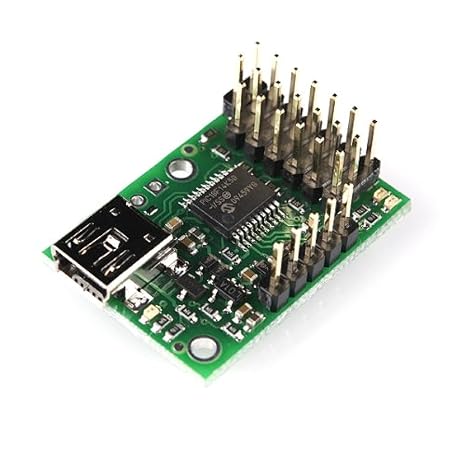
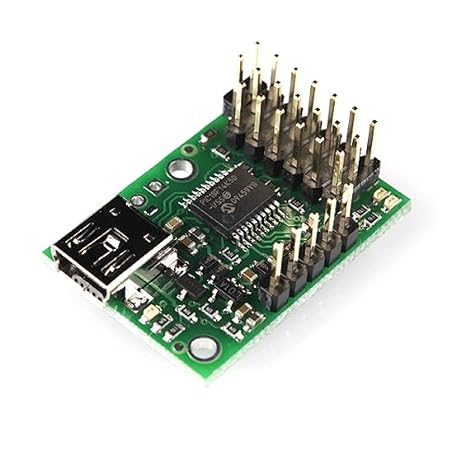
The six-channel Micro maestro raises the performance bar for serial servo controllers with features such as a native USB interface and internal scripting control.

Fast
Shipping

Free
Return*

Secure Packaging

100% Original Products

PCI DSS Compliance

ISO 27001 Certified


Note: Step 1 Voltage Transformer required for using electronics products of US store (110-120). Recommended power converters Buy Now.


What Stands Out
Six Channels
Control up to six servos simultaneously, offering versatility for projects ranging from robotics to automation, making it ideal for hobbyists and professionals alike.
USB Connectivity
Easily connect to computers via USB, ensuring seamless integration with software while providing power to the device, simplifying setup and user experience.
Compact Design
Its small footprint allows for easy incorporation into projects without taking up much space, perfect for tight setups and portable applications.
Product Details
| Package Weight | 1 Pound |
Who Should Buy?

-
Robotics Enthusiasts
Ideal for hobbyists building robots needing precise control over multiple servos for movements and automation.
-
Educational Projects
Perfect for students and educators working on robotics or technology projects that require programmable servo control.
-
DIY Creators
Useful for makers creating interactive projects or models that involve movement, adding functionality with simple programming.

-
Beginner Hobbyists
May be complex for beginners without programming experience to use effectively for controlling servos.
Product Description
Micro Maestro 6-channel USB Servo Controller
Have any Query? Chat with us
Customer Questions & Answers
-
Question:
What is the Micro Maestro 6-channel USB Servo Controller used for?
Answer: The Micro Maestro 6-channel USB Servo Controller is designed for precise control of multiple servos. It allows users to configure and automate servo movements via USB connection, making it ideal for robotics, RC vehicles, and automation projects. With its ability to control up to six servos simultaneously, it ensures high flexibility in design, allowing hobbyists and engineers to implement complex movements easily. -
Question:
How do I connect the Micro Maestro 6-channel USB Servo Controller to my computer?
Answer: To connect the Micro Maestro to your computer, simply use a standard USB cable to link the controller to a USB port. After connection, you will need to install the Maestro Control Center software, which is available on the manufacturer’s website. This software is essential for configuring servo movements and programming. It's commonly used in various applications, making it a go-to choice for hobbyists and professionals alike. -
Question:
Can I control the Micro Maestro via software programming?
Answer: Yes, the Micro Maestro can be controlled using various programming languages, including Python, C++, and more. The controller supports scripts that allow users to create customized movement patterns and sequences. This feature is particularly beneficial for users looking to integrate the controller into a more extensive system or project, such as robotics or automations that require specific timing and coordination. -
Question:
What kind of servos are compatible with the Micro Maestro?
Answer: The Micro Maestro is compatible with standard RC servos, mini servos, and continuous rotation servos, making it versatile for different applications. The controller provides adjustable pulse width settings, ensuring compatibility with various servo types. This flexibility allows users to adjust their projects as needed, whether for robotics, models, or artistic installations. -
Question:
Is it possible to run multiple Micro Maestro controllers together?
Answer: Absolutely! Multiple Micro Maestro controllers can be connected to a single computer using USB hubs, enabling the control of significantly more than six servos simultaneously. This functionality is especially useful for intricate robotic systems requiring dozens of servos, allowing for synchronized movements across multiple controllers. -
Question:
What power requirements does the Micro Maestro have?
Answer: The Micro Maestro requires an external power supply to operate the servos, which can range depending on the number and type of servos connected. Typically, a 5V power supply is sufficient for standard servos. It's crucial to provide the appropriate power to avoid underperformance or damage, especially in larger setups where servo load is considerable. -
Question:
Can the Micro Maestro be used for educational purposes?
Answer: Yes, the Micro Maestro is an excellent tool for educational purposes, particularly in robotics and electronics courses. Its user-friendly setup and programming capabilities make it an effective teaching aid for students learning about servo control, programming, and robotics fundamentals. Institutions can leverage its features to enhance hands-on learning experiences. -
Question:
What kind of feedback can I get from the Micro Maestro?
Answer: The Micro Maestro provides feedback through position reporting, which allows users to track the exact position of each servo. This feedback helps in making precise adjustments and fine-tuning movements during programming. It's beneficial in applications where accuracy is critical, such as robotics and automated machinery, ensuring that tasks are completed as intended. -
Question:
How do I troubleshoot issues with the Micro Maestro?
Answer: Troubleshooting the Micro Maestro typically involves checking power connections, ensuring the correct drivers are installed, and verifying the configuration settings in the Maestro Control Center. If servos aren’t responding, confirming the servo compatibility and recalibrating settings can often resolve the issue. Documented troubleshooting resources can be found on the manufacturer’s website for further assistance. -
Question:
Where can I buy Micro Maestro 6-channel USB Servo Controller in Turks and Caicos?
Answer: You can purchase the Micro Maestro 6-channel USB Servo Controller online through Ubuy, where it is readily available with various shipping options to suit your needs. Ubuy provides a seamless shopping experience, making it a reliable choice for your electronics and hobby project supplies.
SparkFun Data Loggers Editorial Review
The Pololu-1350 Micro Maestro 6-Channel USB Servo Controller is an easy-to-use device for controlling servos. It can be powered by the USB port or from the servos' power supply. It works with standard servos that use PWM pulses. The channels can be used as analog or digital inputs, and the controller is programmable. The controller can be used with multiple devices on the same computer. It is recommended for small servos that run on 5 volts. The Pololu program for the servo driver works well and has an easy interface to program for. The wires can be up to 50ft long, but there may be voltage attenuation. The controller is not recommended for use as an LED controller. Overall, customers have had positive experiences with this product, finding it easy to use and reliable.
Customer Reviews & Ratings
1 customers ratings
-
5 Star
100%
-
4 Star
0%
-
3 Star
0%
-
2 Star
0%
-
1 Star
0%
Review this product
Share your thoughts with other customers
Pros
- Easy to use
- Can be powered by USB or servos' power supply
- Works with standard servos using PWM pulses
- Channels can be used as analog or digital inputs
- Programmable
- Can be used with multiple devices on the same computer
- Suitable for small servos running on 5 volts
- Pololu program for the servo driver works well
- Wires can be up to 50ft long
Cons
- Not recommended for use as an LED controller
Platform Trust & Buyer Confidence

MA
Mohammad
Verified buyer
“Excellent quality and original too,when ubuy send original things I will appreciate that ,I very satisfied thank you”
23 July 2026 · via Trustpilot
CK
Chitra
Verified buyer
“The order and delivery progress was communicated very well. Package arrived within the estimated time. Products arrived as expected in good condition.”
22-Jul-26 · via Trustpilot
K
kund
Verified buyer
“Good supply of products. Safe payment methods, and shipment worldwide! Genuine products.”
23-Jul-26 · via Trustpilot
OO
Onesi
Verified buyer
“Was my first time buying a product from Ubuy, but I found it so helpful. This is reliable. Gonna place a new order!”
22 July 2026 · via Trustpilot
SJ
SAO JOHN
Verified buyer
“Ubuy is a great online platform to buy stuff. Reliable, fast delivery time and great value for money. I've been using Ubuy online shopping platform for three years now and will continue to do so.”
23 July 2026 · via Trustpilot
Secure Checkout
Global Delivery
Easy Returns
Genuine Products
Product Price History
Important information
- Limitations : For products shipped internationally, please note that any manufacturer warranty may not be valid; manufacturer service options may not be available; product manuals, instructions, and safety warnings may not be in destination country languages; the products (and accompanying materials) may not be designed in accordance with destination country standards, specifications, and labeling requirements; and the products may not conform to destination country voltage and other electrical standards (requiring use of an adapter or converter if appropriate). The recipient is responsible for assuring that the product can be lawfully imported to the destination country. When ordering from Ubuy or its affiliates, the recipient is the importer of record and must comply with all laws and regulations of the destination country.
- Not all the products listed on Ubuy are for sale, as Ubuy is a global search engine. Products are subject to export/trade regulations.
USD 47
Order now and get it around Thursday, August 13
This item is not restrict in my country.(Please click on above link if this item is not restrict in your country, So our team will review and allow.)
QTY:
Secured transaction
PCI DSS compliant and ISO 27001:2022 certified, with encrypted payments and full buyer protection on every order.
Our Top Logistics Partners
Fastest cross-border delivery
Features & Benefits
- High-performance servo control (0.25Μs resolution with built-in speed and acceleration control)
- Versatile device for servo control or general I/O control
- Supports three control methods: USB, TTL serial, and internal scripting
- Can be configured as servo outputs, digital outputs, or analog inputs
- Individual speed and acceleration control for each channel
- Compact size of 0.85 x 1.20
Ubuy Assurance
Experience worry-free shopping with 100% original products, PCI DSS-compliant payment security, ISO 27001-certified data protection, the fastest cross-border delivery, free returns *, and secure packaging on every order.