0 ratings


Item #:
39538640
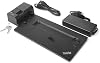
New Genuine Dock for Lenovo Thinkpad Ultra Docking Station with 135W AC Adapter SD20T34312 40AJ0135US
Item #:
39538640
USD 129
Price Details
Excluding Shipping & Custom charges ( Shipping and custom charges will be calculated on checkout )
*All items will import from US
0 ratings
Write a review
Out of stock
 Imported from USA store
Secured transaction
Ubuy works hard to protect your security and privacy. Our advanced payment security system ensures confidentiality by encrypting your information during transmission using AES (Advanced Encryption Standards) and SSL (Secure Socket Layer) protocols. Your payment details are 100% secure as we do not share your payment details with third party sellers.
Our Top Logistics Partners


The ThinkPad Ultra Docking Station provides the best docking experience for large enterprise ThinkPad customers.

Fast
Shipping

Free
Return*

Secure Packaging

100% Original Products

PCI DSS Compliance

ISO 27001 Certified


Note: Step 1 Voltage Transformer required for using electronics products of US store (110-120). Recommended power converters Buy Now.


What Stands Out
Compatibility
Designed specifically for Lenovo ThinkPad laptops, ensuring seamless connectivity and optimized performance for various models, enhancing productivity and user experience without compatibility concerns.
140W Power Delivery
Provides a powerful 135W AC adapter that supports fast and efficient charging, allowing users to power their laptops and connected devices simultaneously, eliminating downtime during critical tasks.
Multiple Ports
Equipped with a wide array of ports including USB, DisplayPort, and HDMI, making it easy to connect multiple peripherals and displays, thereby creating an efficient and organized workspace.
Product Details
- Ports: 2x DisplayPort 1.4, 1x HDMI 2.0, 1x VGA, 2x USB-C (10Gbps, 5V/3A power), 4x USB 3.0 Gen 2 (10 Gbps, 1 always-on USB Charging)
- Additional Ports: 1x 3.5 mm Stereo/Mic Combo Port, 1x Gigabit Ethernet Port, 1x Kensington security lock slot
- Compatibility: Lenovo ThinkPad models including A285, A485, T480s, T580, X1 Carbon 6th Gen, X280, etc.
- Rapid charging support and mirrored power button for convenience
- 10 Gbps data transfer through four USB 3.1 ports
- Designed for enterprise environments with support for PXE boot, wake on LAN, and MAC address pass-through
| Item Weight | 3.5 lbs (1.59 kg) |
Who Should Buy?

-
Business Professionals
Ideal for professionals who require multiple monitors and peripherals to enhance productivity in a corporate environment.
-
Frequent Travelers
Great for users who travel often, providing a portable charging solution that minimizes the need for multiple adaptors.
-
Tech Enthusiasts
Perfect for tech-savvy users who benefit from versatile connectivity options and high power output for their devices.

-
Casual Users
Not suitable for casual users who only need basic connectivity and minimal peripherals in everyday use.
-
Budget-Conscious Shoppers
May not appeal to users looking for a low-cost solution, as this docking station is a premium option.
-
Gaming Enthusiasts
Not optimized for high-performance gaming setups requiring specific GPU and port configurations beyond standard docking capabilities.
Product Description
New Genuine Dock for Lenovo Thinkpad Ultra Docking Station with 135W AC Adapter SD20T34312 40AJ0135US
Have any Query? Chat with us
Customer Questions & Answers
-
Question:
What devices are compatible with the Lenovo Thinkpad Ultra Docking Station?
Answer: The Lenovo Thinkpad Ultra Docking Station is engineered for a broad range of Lenovo Thinkpad laptops, including models like the T, X, and L series. Its compatibility ensures that users can easily connect their laptops to external peripherals such as monitors, keyboards, and mice without additional drivers. This is particularly useful in office environments where multiple connections are required for optimal productivity. -
Question:
What are the primary features of the Lenovo Thinkpad Ultra Docking Station?
Answer: This docking station features multiple USB ports, HDMI and DisplayPort outputs, as well as an Ethernet port, enabling seamless connectivity for various devices. In addition, the 135W AC adapter provides sufficient power for charging your laptop while it's docked. These features enhance the user's workspace by reducing cable clutter and simplifying the process of connecting to multiple devices. -
Question:
Is the Lenovo Thinkpad Ultra Docking Station portable?
Answer: While this docking station is designed primarily for desktop use, it is relatively lightweight and compact, making it somewhat portable. Users may find it easy to move between locations, such as home and office, as it can streamline the connection process for frequent travelers using Thinkpad laptops. However, it is best utilized as a fixed workstation hub. -
Question:
Can I connect multiple monitors using the Lenovo Thinkpad Ultra Docking Station?
Answer: Yes, the Lenovo Thinkpad Ultra Docking Station supports multiple monitor configurations. It includes HDMI and DisplayPort outputs, allowing users to connect up to two external displays for enhanced multitasking. This setup is ideal for professionals involved in data analysis, graphic design, or any task that benefits from expanded screen real estate. -
Question:
How does the Lenovo Thinkpad Ultra Docking Station enhance productivity?
Answer: The docking station streamlines connections to essential peripherals, providing a single point of contact for multiple devices. Because it allows for rapid connectivity and disconnection, users can switch between mobile and stationary work setups without hassle. This convenience can lead to significant improvements in efficiency, especially in hybrid working environments. -
Question:
What is the power output of the AC adapter included with the docking station?
Answer: The included 135W AC adapter provides sufficient power to charge your Lenovo Thinkpad laptop while simultaneously powering connected devices. This means you can eliminate the need for multiple chargers, keeping your workspace tidy and ensuring your laptop remains charged throughout the day. It’s especially advantageous for users who rely on heavy software that requires additional power during operation. -
Question:
Are there any specific software requirements for using the docking station?
Answer: Typically, the Lenovo Thinkpad Ultra Docking Station does not require any additional software for basic functionality with compatible devices. However, Lenovo recommends updating your laptop's drivers and firmware to enhance compatibility and performance. Utilizing the latest software ensures that you can take full advantage of all features, optimizing your user experience. -
Question:
What type of cables are needed to connect the docking station to external monitors?
Answer: To connect external monitors, you will need HDMI or DisplayPort cables, which are usually standard and can be purchased separately if not included in your monitor package. Using high-quality cables can help maintain video quality and ensure a stable connection, which is crucial for tasks that require precise visuals, such as graphic design or video editing. -
Question:
Can I use the docking station with other brands of laptops?
Answer: The Lenovo Thinkpad Ultra Docking Station is specifically designed for Lenovo Thinkpad laptops. While it may work with other laptops via basic USB connections, full functionality, particularly related to power delivery and display outputs, is typically optimized for Lenovo devices. Users looking for universal docking solutions may need to consider alternative products. -
Question:
Where can I buy the New Genuine Dock for Lenovo Thinkpad Ultra Docking Station?
Answer: You can purchase the New Genuine Dock for Lenovo Thinkpad Ultra Docking Station with the 135W AC Adapter on Ubuy. This platform offers a wide selection of Lenovo accessories, ensuring you get authentic products delivered conveniently. It's a reliable source for tech enthusiasts looking to enhance their workstation setup.
Comp XP Editorial Review
No editorial reviews found
Customer Reviews & Ratings
1 customers ratings
-
5 Star
100%
-
4 Star
0%
-
3 Star
0%
-
2 Star
0%
-
1 Star
0%
Review this product
Share your thoughts with other customers
Pros
- Compatible with multiple Lenovo models
- Fast charging with 135W adapter
- Multiple USB and video ports
- Compact and sturdy design
- Easy plug-and-play setup
Cons
- May have limited compatibility with non-Lenovo devices
Product Price History
Important information
- Limitations : For products shipped internationally, please note that any manufacturer warranty may not be valid; manufacturer service options may not be available; product manuals, instructions, and safety warnings may not be in destination country languages; the products (and accompanying materials) may not be designed in accordance with destination country standards, specifications, and labeling requirements; and the products may not conform to destination country voltage and other electrical standards (requiring use of an adapter or converter if appropriate). The recipient is responsible for assuring that the product can be lawfully imported to the destination country. When ordering from Ubuy or its affiliates, the recipient is the importer of record and must comply with all laws and regulations of the destination country.
- Not all the products listed on Ubuy are for sale, as Ubuy is a global search engine. Products are subject to export/trade regulations.
USD 129
Currently unavailable.
We don't know when or if this item will be back in stock.
This item is not restrict in my country.(Please click on above link if this item is not restrict in your country, So our team will review and allow.)
Secured transaction
Ubuy works hard to protect your security and privacy. Our advanced payment security system ensures confidentiality by encrypting your information during transmission using AES (Advanced Encryption Standards) and SSL (Secure Socket Layer) protocols. Your payment details are 100% secure as we do not share your payment details with third party sellers.
Our Top Logistics Partners
Fastest cross-border delivery
Features & Benefits
- Innovative side connector minimizes desk space
- Intel vPro, PXE boot, Wake-on LAN, and MAC address pass-through
- Can charge mobile devices with 15W and 10.5W from USB-C port and USB3.0 always power-on port respectively
- Compatible with a wide range of Lenovo ThinkPad models
- Delivers 10 Gbps data transfer through four USB 3.1 ports
- Connect up to three UHD displays for maximum productivity gains