- Home Page /
- Electronics /
- Computer Accessories /
- Computer Accessories & Peripherals /
- Input Devices /
- Trackballs /
- ELECOM EX-G Wired Trackball Mouse, Ergonomic ...
0 ratings


Item #:
57800718
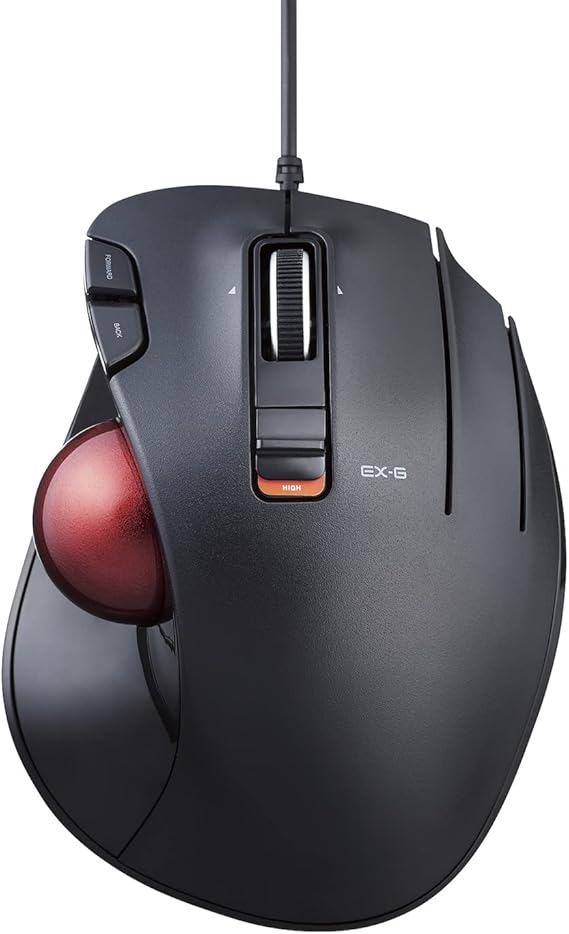
ELECOM EX-G Wired Trackball Mouse, Ergonomic Thumb Control, Smooth Tracking Roller Ball, 5 Programmable Buttons, Tilt Scroll, Computer Mice for PC Mac
77% of respondents would recommend this to a friend
Item #:
57800718
USD 49
Price Details
Excluding Shipping & Custom charges ( Shipping and custom charges will be calculated on checkout )
*All items will import from US
0 ratings
Write a review
In stock
 Imported from USA store
QTY:
Order now and get it around Tuesday, September 29
Secured transaction
Ubuy works hard to protect your security and privacy. Our advanced payment security system ensures confidentiality by encrypting your information during transmission using AES (Advanced Encryption Standards) and SSL (Secure Socket Layer) protocols. Your payment details are 100% secure as we do not share your payment details with third party sellers.
Our Top Logistics Partners


Experience superior craftsmanship with our EX-G ergonomic trackball mouse series, designed to minimize wrist and hand stress.

Fast
Shipping

Free
Return*

Secure Packaging

100% Original Products

PCI DSS Compliance

ISO 27001 Certified



Note: Step 1 Voltage Transformer required for using electronics products of US store (110-120). Recommended power converters Buy Now.


What Stands Out
Ergonomic Design
The ELECOM EX-G trackball mouse promotes a comfortable hand position, reducing strain during extended use. Ideal for users seeking a more natural grip while navigating their digital workspace efficiently.
Smooth Tracking
Featuring a precision roller ball, this mouse delivers exceptional tracking accuracy on various surfaces. Users can enjoy seamless navigation without the need for constant mouse movement, enhancing productivity.
Customizable Buttons
Equipped with five programmable buttons, this mouse allows personalization of shortcuts for commonly used functions. Tailor your workflow to streamline tasks and improve efficiency, catering specifically to individual user needs.
Product Details
| Connectivity Technology | USB, Wired |
| Additional Features | Portable |
| Movement Detection | Optical |
| Button Quantity | 5 |
| Hand Orientation | Right |
| Compatible Devices | Personal Computer |
| Operating System | Windows 10, Windows 7, Windows 8.1, Windows Vista |
| Hardware Platform | Mac, PC |
| Power Source | Corded Electric |
| Minimum Required Operating System Version | Windows Vista |
| Range | 5.0 meters |
| Color | Red Ball (Recommended) |
| Style Name | Wired_RedBall |
| Enclosure Material | Plastic |
| Brand | u30a8u30ecu30b3u30e0(ELECOM) |
| Model Name | EX-G |
| Antenna Location | Gaming |
| Model Number | M-XT2URBK-G |
| Included Components | AA Battery, Product Manual, Trackball |
| Manufacturer | ELECOM |
| Item Type Name | ELECOM Wired Thumb-operated Trackball Mouse, 5-Button Function with Smooth Tracking, Precision Optical Gaming Sensor (M-XT2URBK-G) |
| Mfr Part Number | M-XT2URBK-G |
| Item Weight | 5.3 ounces (150.26 grams) |
| Item Dimensions L x W | 4.9"L x 3.7"W (12.4 cm) |
| Unit Count | 1 Count |
| Special Feature | Portable |
| Movement Detection Technology | Optical |
Who Should Buy?

-
Ergonomic Enthusiasts
Users seeking a comfortable design will appreciate the ergonomic thumb control and reduced wrist strain.
-
Creative Professionals
Graphic designers and video editors can utilize the smooth tracking roller ball for precision work.
-
Portable Users
Individuals who travel with their devices will benefit from the compact design and wired connectivity.

-
Gaming Enthusiasts
Gamers may prefer standard mice for faster response times and additional freedom of motion.
Product Description
ELECOM EX-G Wired Trackball Mouse, Ergonomic Thumb Control, Smooth Tracking Roller Ball, 5 Programmable Buttons, Tilt Scroll, Computer Mice for PC Mac
Have any Query? Chat with us
Customer Questions & Answers
-
Question:
What are the key features of the ELECOM EX-G Wired Trackball Mouse?
Answer: The ELECOM EX-G Wired Trackball Mouse comes equipped with ergonomic thumb control, featuring a smooth tracking roller ball and five programmable buttons for customized functionality. The tilt scroll offers an intuitive navigation experience, making it suitable for both casual users and professionals. Its design prioritizes comfort, reducing the strain on your wrist, which is a common issue with traditional mice. This mouse is particularly beneficial for graphic designers and gamers who require precise control. -
Question:
How does the trackball function in the ELECOM EX-G mouse improve productivity?
Answer: The trackball function allows users to navigate the cursor without having to move the entire mouse. This means less wrist movement, which can help in avoiding repetitive strain injuries over extended usage. It's ideal for multi-monitor setups and situations where desk space is limited. Users, especially designers and developers, can enjoy smoother and faster navigation through complex interfaces without the interruptions caused by lifting and repositioning a standard mouse. -
Question:
Can I use the ELECOM EX-G Wired Trackball Mouse with both PC and Mac systems?
Answer: Yes, the ELECOM EX-G Wired Trackball Mouse is compatible with both PC and Mac systems. This versatility makes it an excellent choice for users who switch between different operating systems. Its plug-and-play functionality allows for seamless integration, meaning you can use it instantly without needing additional software or drivers. This cross-compatibility makes it a valuable tool for professionals collaborating on projects across different platforms. -
Question:
What is the ergonomic design of the ELECOM EX-G mouse like?
Answer: The ergonomic design of the ELECOM EX-G mouse focuses on reducing wrist strain and improving comfort during prolonged use. The thumb-controlled trackball allows your hand to stay in a relaxed position, promoting a natural grip. This design is particularly useful for users who spend long hours working on their computers, such as office workers and gamers. By prioritizing ergonomics, this mouse helps maintain productivity while minimizing discomfort. -
Question:
How do the programmable buttons enhance the usability of the ELECOM EX-G mouse?
Answer: The five programmable buttons on the ELECOM EX-G mouse allow users to customize their experience by assigning specific functions or shortcuts. This feature can significantly enhance productivity, enabling quick access to frequently used commands or macros. For instance, graphic designers can set a button for often-used tools in design software, allowing for smoother workflow during creative tasks. Gamers can also assign actions for in-game controls, enhancing their gaming experience. -
Question:
What kind of tracking technology does the ELECOM EX-G mouse use?
Answer: The ELECOM EX-G mouse utilizes advanced optical tracking technology, ensuring smooth and precise movements on various surfaces. This technology provides accurate cursor control, which is essential for detailed tasks such as graphic design or editing. Unlike traditional mice, the optical system allows for effective tracking without the need for a mouse pad, making it ideal for mobile or minimal setups. This feature benefits users who need reliable performance in diverse working environments. -
Question:
Is the ELECOM EX-G mouse suitable for gaming?
Answer: Yes, the ELECOM EX-G Wired Trackball Mouse is well-suited for gaming. The precision offered by the trackball provides gamers with fine control over movements in fast-paced games, enhancing their overall performance. Additionally, the programmable buttons allow for quick actions, such as weapon switching or ability usage, catering to various gaming styles. Its ergonomic design also supports longer gaming sessions by reducing hand fatigue. -
Question:
Does the ELECOM EX-G mouse come with software for customization?
Answer: The ELECOM EX-G mouse includes user-friendly software that allows for extensive customization of its buttons and functions. Users can easily tailor the mouse settings to suit their workflow or gaming profile. This adaptability is particularly valuable for professionals and gamers who rely on specific features to optimize their performance. The software simplifies the process of assigning macros or adjusting tracking sensitivity, making it accessible for users with different technical backgrounds. -
Question:
How does tilt scrolling work on the ELECOM EX-G mouse?
Answer: Tilt scrolling on the ELECOM EX-G mouse allows users to scroll horizontally as well as vertically, enhancing usability when navigating wide documents or web pages. This feature is especially beneficial for tasks such as spreadsheet editing and browsing wide web content. The ability to tilt scroll can significantly improve efficiency, allowing users to find information quickly without having to click and drag. -
Question:
Where can I buy the ELECOM EX-G Wired Trackball Mouse in Turks and Caicos?
Answer: You can purchase the ELECOM EX-G Wired Trackball Mouse from Ubuy. Ubuy offers a convenient platform where you can find this innovative trackball mouse along with various options for enjoying its features. With Ubuy's streamlined purchasing process, you can confidently shop for the latest technology products, ensuring you receive a quality item that suits your needs.
エレコム(ELECOM) Trackballs M-XT2URBK-G Editorial Review
ELECOM EX-G Wired Trackball Mouse, Ergonomic Thumb Control, Smooth Tracking Roller Ball, 5 Programmable Buttons, Tilt Scroll, Computer Mice for PC Mac provides a unique alternative to traditional mouse setups, especially for users looking for comfort and functionality. Many users appreciate its ergonomic design, which helps reduce strain during long hours of use, and the smooth tracking capabilities of the roller ball allow for precise navigation. Some reviews lamented the occasional sticking of the ball, but overall, its premium buttons and wired convenience are praised. Many users experienced a seamless plug-and-play functionality right out of the box, making it an appealing choice for both work and gaming.
Customer Reviews & Ratings
1 customers ratings
-
5 Star
100%
-
4 Star
0%
-
3 Star
0%
-
2 Star
0%
-
1 Star
0%
Review this product
Share your thoughts with other customers
Pros
- Ergonomic design reduces hand and wrist strain
- Five programmable buttons enhance functionality
- Smooth roller ball tracking allows precision
- Durable build quality with sturdy construction
Cons
- Ball may stick during use but is manageable
Platform Trust & Buyer Confidence

JK
Jasmin
Verified buyer
“Great products and very good service: very easy and very fast international delivery.”
9 September 2026 · via Trustpilot
AG
Anke
Verified buyer
“Wonderful online shopping experience, smooth transaction from the start. Payment method works conveniently and delivery is unexpectedly fast and reliable. You go the extra mile for service. What makes this even more amazing, you deliver to Namibia. I will remain a happy Ubuy customer and will increase my purchases for sure! Thank you!”
10 September 2026 · via Trustpilot
H
Hazel
Verified buyer
“Very easy to find the products what you need, and so fast delivery, that’s why I highly recommended to others costumers to used ubuy.”
10 September 2026 · via Trustpilot
O
Opaleye
Verified buyer
“I received exactly what I ordered I was skeptical about your site because that was my first time to order. But the order came timely and neatly packaged. I was not disappointed. Thank you.”
11 September 2026 · via Trustpilot
AC
Adele
Verified buyer
“Easy to find and order what you want on the website. Delivery is quick to the UK”
8 September 2026 · via Trustpilot
Secure Checkout
Global Delivery
Easy Returns
Genuine Products
Product Price History
Important information
- Limitations : For products shipped internationally, please note that any manufacturer warranty may not be valid; manufacturer service options may not be available; product manuals, instructions, and safety warnings may not be in destination country languages; the products (and accompanying materials) may not be designed in accordance with destination country standards, specifications, and labeling requirements; and the products may not conform to destination country voltage and other electrical standards (requiring use of an adapter or converter if appropriate). The recipient is responsible for assuring that the product can be lawfully imported to the destination country. When ordering from Ubuy or its affiliates, the recipient is the importer of record and must comply with all laws and regulations of the destination country.
- Not all the products listed on Ubuy are for sale, as Ubuy is a global search engine. Products are subject to export/trade regulations.
USD 49
Order now and get it around Tuesday, September 29
This item is not restrict in my country.(Please click on above link if this item is not restrict in your country, So our team will review and allow.)
QTY:
Secured transaction
PCI DSS compliant and ISO 27001:2022 certified, with encrypted payments and full buyer protection on every order.
Our Top Logistics Partners
Fastest cross-border delivery
Features & Benefits
- Ergonomic design minimizes wrist and hand stress.
- Enhances productivity for office work, creative software, and gaming.
- High-performance optical sensor for precise tracking.
- Smooth thumb control trackball allows effortless cursor movement.
- USB wired connectivity ensures a lag-free experience.
- No battery worries, powered directly via USB.
Ubuy Assurance
Experience worry-free shopping with 100% original products, PCI DSS-compliant payment security, ISO 27001-certified data protection, the fastest cross-border delivery, free returns *, and secure packaging on every order.