0 ratings

Item #:
73661957
LCD Screen Replacement for Lenovo 100e Chromebook Gen 2 3 4 81QB 81M8 81MA 82GJ 82Q3 82J7 82J8 82V0 82UY 83G8 83G9 82W1 82W0 / 100w Gen 3 4 82HY 82J0
Item #:
73661957
USD 37
Price Details
Excluding Shipping & Custom charges ( Shipping and custom charges will be calculated on checkout )
*All items will import from US
0 ratings
Write a review
In stock
 Imported from USA store
QTY:
Order now and get it around Monday, June 29
Secured transaction
Ubuy works hard to protect your security and privacy. Our advanced payment security system ensures confidentiality by encrypting your information during transmission using AES (Advanced Encryption Standards) and SSL (Secure Socket Layer) protocols. Your payment details are 100% secure as we do not share your payment details with third party sellers.
Our Top Logistics Partners


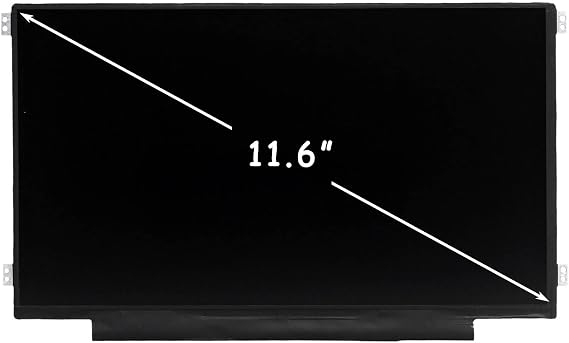
New LCD panel Replacement;Non touch;1366*768 resolution;11.6 inch;30 pin;For Lenovo 100e Chromebook 2nd Gen/100e Chromebook Gen 3/100w Gen 3 seriesMounting brackets: Right & Left brakets;Standard TN (NON IPS)With 90 days for return

Fast
Shipping

Free
Return*

Secure Packaging

100% Original Products

PCI DSS Compliance

ISO 27001 Certified


Note: Step 1 Voltage Transformer required for using electronics products of US store (110-120). Recommended power converters Buy Now.


What Stands Out
Compatibility
Designed for multiple Lenovo 100e and 100w Chromebook models, ensuring seamless installation and a perfect fit, providing hassle-free replacement for users across various generations.
High Resolution
Offers a clear 11.6" LED display with 1366x768 resolution, enhancing visual clarity for browsing, studying, and multimedia use, delivering an immersive viewing experience.
Durability
Constructed with high-quality materials for long-lasting performance, ensuring reliability and resilience against daily wear and tear, making it an ideal choice for students and professionals alike.
Product Details
| Item Weight | 1.5 lbs (680 grams) |
Who Should Buy?

-
DIY Repair Enthusiasts
Users comfortable with repairs will find this replacement screen easy to install for Lenovo Chromebooks.
-
Budget-Conscious Consumers
Cost-effective option for those needing a screen replacement without spending on a new device.
-
Students with Devices
Ideal for students relying on Lenovo Chromebooks for learning and need a functioning screen.

-
Non-Tech Savvy Users
Individuals lacking technical skills may struggle with the installation or repair process.
-
High-End Gamers
Gamers needing advanced display features will find this basic screen not suitable for gaming.
-
Older Chromebook Models
Not suitable for users with earlier Lenovo models not specified in product compatibility.
Product Description
LCD Screen Replacement for Lenovo 100e Chromebook Gen 2 3 4 81QB 81M8 81MA 82GJ 82Q3 82J7 82J8 82V0 82UY 83G8 83G9 82W1 82W0 / 100w Gen 3 4 82HY 82J0 82VK 82VL LED Display 11.6" 1366x768
Have any Query? Chat with us
Customer Questions & Answers
-
Question:
What are the key specifications of the LCD Screen Replacement for Lenovo 100e Chromebook?
Answer: The LCD Screen Replacement for Lenovo 100e Chromebook features a 11.6-inch display with a resolution of 1366 x 768 pixels. It’s designed specifically for various models, including the 2nd Gen 81QB, 81M8, 81MA, 82Q3, and the Gen 3 82J7, 82J8, 82UY, 82V0, as well as the Lenovo 100w Gen. This ensures compatibility across multiple variants, providing high-quality visuals and functionalities similar to the original screen. Whether you're watching videos, browsing, or working on projects, this screen replacement optimizes your experience. -
Question:
How do I install the LCD Screen Replacement for Lenovo 100e Chromebook?
Answer: Installing the LCD screen replacement can be done with basic tools. First, you will need to carefully open the Chromebook casing by removing the screws and using a prying tool. Disconnect the old screen cable and carefully detach the broken screen from the hinge. Align the new LCD screen, connect the cable, and secure it in place. Finally, reattach the casing. It’s beneficial to follow a video tutorial or detailed guide for visual references, making sure all connections are secure for proper functionality. -
Question:
Is this screen replacement compatible with all Lenovo 100e Chromebook models?
Answer: This LCD Screen Replacement is designed specifically to fit the Lenovo 100e Chromebook 2nd Gen models (81QB, 81M8, 81MA, 82Q3) as well as the 3rd Gen models (82J7, 82J8, 82UY, 82V0), and the Lenovo 100w Gen. Each model has slightly different specifications, so confirming compatibility before purchase ensures that you are getting the right part for your device. This targeted compatibility makes it a reliable choice for maintaining your Chromebook's performance and display quality. -
Question:
What should I do if my LCD screen has dead pixels?
Answer: If your LCD screen replacement shows dead pixels after installation, it may be a manufacturing defect. It’s advisable to first check for any connection issues such as loose cables—ensuring the screen is properly connected can sometimes resolve the problem. If the issue persists, contacting your supplier for support is recommended. It's beneficial to test the screen with different applications and background colors; sometimes, dead pixels may not be prominent under certain circumstances but, addressing this quickly ensures a satisfactory user experience. -
Question:
How can I prevent damage to my new LCD screen?
Answer: To protect your new LCD screen, consider using a sturdy laptop case or sleeve when transporting your Chromebook. Avoid placing heavy objects on top of your device, and always clean the screen with a microfiber cloth to prevent scratches. Positioning your device away from direct sunlight also protects against heat damage. Additionally, setting your screen brightness to a moderate level can help reduce the wear on the display. Taking these steps will improve the longevity of your screen replacement, ensuring consistent performance. -
Question:
What are common signs of a failing LCD screen?
Answer: Common indicators of a failing LCD screen include flickering visuals, discoloration, and distortion in images. If you notice horizontal or vertical lines on your display, or sections of the screen that remain dark or unresponsive, these symptoms signal that it’s time for a replacement. It's essential to assess these signs early to prevent further damage to your device. When these issues arise, promptly considering an LCD screen replacement can restore visual quality and performance, improving your overall browsing experience. -
Question:
Can I replace the screen myself, or should I seek professional help?
Answer: Replacing the screen yourself is feasible if you have basic technical skills and the right tools. However, if you are uncomfortable with DIY repairs, seeking professional assistance can ensure a proper installation. Many local repair shops specialize in Chromebook repairs, which can provide peace of mind. If you opt for a DIY approach, following video guides and tutorials can enhance your success rate. Assessing your comfort level with technical tasks is essential in making this decision. -
Question:
Does the screen replacement affect the overall performance of the Chromebook?
Answer: No, using a compatible LCD screen replacement will not negatively affect the performance of your Chromebook. In fact, a new and properly installed screen can enhance your experience by providing clearer visuals and improved response times. This is particularly important for tasks requiring good display quality, such as video conferences or creative work. Ensuring the replacement is compatible with your model is key to maintaining the existing performance standards of your device. -
Question:
What tools do I need to replace the LCD screen?
Answer: To replace the LCD screen on your Lenovo 100e Chromebook, you will typically need a small Phillips screwdriver, a plastic prying tool, and possibly a suction cup for better grip on the screen. It’s advisable to also have a clean, soft cloth on hand to avoid scratching the screen during the handling process. Having these tools ready not only streamlines the replacement process but also ensures that you can safely and effectively remove the old screen without damaging any other components. -
Question:
Where can I buy LCD Screen Replacement for Lenovo 100e Chromebook in Turks and Caicos?
Answer: You can purchase the LCD Screen Replacement for Lenovo 100e Chromebook from Ubuy in Turks and Caicos. Ubuy provides a range of electronic components, including specific parts for various laptop models. Their platform offers user-friendly navigation to help you find the right screen replacement, along with product details and specifications ensuring proper compatibility. By relying on Ubuy, customers gain access to trusted products and enhanced customer service for their online shopping experience.
FirstLCD Replacement Screens Editorial Review
**** The LCD Screen Replacement for Lenovo 100e Chromebook has garnered substantial attention from users who require a reliable solution for damaged screens. Customers appreciate the clarity and vividness of the display once installed, indicating that the replacement functions well to restore the original visual quality of the device. Many users have noted the ease of installation, with some mentioning that the entire process took Considerably less time than anticipated. The product’s compatibility with various Lenovo models, including the 100e 2nd and 3rd Generation and 100w Gen, further enhances its appeal as it provides a versatile option for different users looking to extend the life of their devices. On the downside, a few customers have reported issues related to mismatch or slight variations in color and brightness when compared to the original screens, which may impact the overall viewing experience for those who are particularly sensitive to display settings. Despite these concerns, the majority Consensus remains positive, with users typically satisfied with the performance of the replacement screen. In conclusion, this LCD Screen Replacement stands out as a solid option for Lenovo 100e Chromebook users needing a fix for a broken screen. Its affordability, ease of installation, and overall quality make it a product that many would recommend, particularly for those looking for a quick and reliable repair solution. **
Customer Reviews & Ratings
1 customers ratings
-
5 Star
100%
-
4 Star
0%
-
3 Star
0%
-
2 Star
0%
-
1 Star
0%
Review this product
Share your thoughts with other customers
Pros
- Excellent clarity and vividness of the display post-installation.
- Easy and quick installation process.
- Broad compatibility with various Lenovo 100e models.
- Cost-effective solution for screen repair.
Cons
- Minor discrepancies in display performance reported by a few users.
Product Price History
Important information
- Limitations : For products shipped internationally, please note that any manufacturer warranty may not be valid; manufacturer service options may not be available; product manuals, instructions, and safety warnings may not be in destination country languages; the products (and accompanying materials) may not be designed in accordance with destination country standards, specifications, and labeling requirements; and the products may not conform to destination country voltage and other electrical standards (requiring use of an adapter or converter if appropriate). The recipient is responsible for assuring that the product can be lawfully imported to the destination country. When ordering from Ubuy or its affiliates, the recipient is the importer of record and must comply with all laws and regulations of the destination country.
- Not all the products listed on Ubuy are for sale, as Ubuy is a global search engine. Products are subject to export/trade regulations.
USD 37
Order now and get it around Monday, June 29
This item is not restrict in my country.(Please click on above link if this item is not restrict in your country, So our team will review and allow.)
QTY:
Secured transaction
Ubuy works hard to protect your security and privacy. Our advanced payment security system ensures confidentiality by encrypting your information during transmission using AES (Advanced Encryption Standards) and SSL (Secure Socket Layer) protocols. Your payment details are 100% secure as we do not share your payment details with third party sellers.
Our Top Logistics Partners
Fastest cross-border delivery
Features & Benefits
- Brand-new & High quality LCD Screen Assembly
- Compatible with Lenovo 100e Chromebook 2nd Gen/100e Chromebook Gen 3/100w Gen 3 series
- Non touch screen with 1366*768 resolution and 11.6 inch size
- Comes with mounting brackets (Right & Left brackets)
- Standard TN (NON IPS) display technology
- 90 days return policy