- Home Page /
- Electronics /
- Computer Accessories /
- Tablet Replacement Parts /
- Screens /
- for iPad 9th Gen Generation Touch Screen for ...
0 ratings






Item #:
223053108
for iPad 9th Gen Generation Touch Screen for iPad 9 A2602 Screen Replacement for iPad 10.2 2021 Digitizer A2603 A2604 A2605 Glass Sensor Panel (with
Item #:
223053108
USD 24
Price Details
Excluding Shipping & Custom charges ( Shipping and custom charges will be calculated on checkout )
*All items will import from US
In stock
 Imported from USA store
QTY:
Order now and get it around Saturday, June 27
Secured transaction
Ubuy works hard to protect your security and privacy. Our advanced payment security system ensures confidentiality by encrypting your information during transmission using AES (Advanced Encryption Standards) and SSL (Secure Socket Layer) protocols. Your payment details are 100% secure as we do not share your payment details with third party sellers.
Our Top Logistics Partners


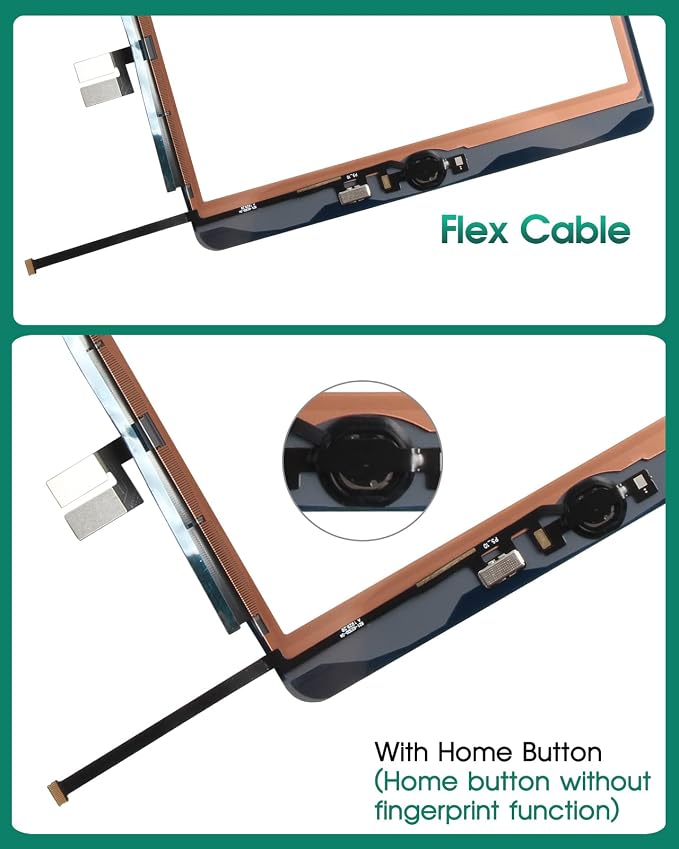
Our Screen Is High Quality Touch Screen Replacement For iPad 9 9th Gen With Home Button(Not Support Touch ID)

Fast
Shipping

Free
Return*

Secure Packaging

100% Original Products

PCI DSS Compliance

ISO 27001 Certified


Note: Step 1 Voltage Transformer required for using electronics products of US store (110-120). Recommended power converters Buy Now.


What Stands Out
High-Quality Touch
Experience responsive and accurate touch control with this premium digitizer, ensuring smooth navigation and interaction for your iPad 9th Gen, enhancing usability for work or entertainment.
Complete Replacement
Includes a home button for a seamless replacement, making it easy to restore your iPad 10.2 to its original functionality without needing extra parts or tools.
Perfect Fit
Designed specifically for iPad models A2602, A2603, A2604, and A2605, guaranteeing a precise fit and easy installation, addressing common frustration with incompatible parts.
Product Details
- ▲HOME BUTTON NO TOUCH ID▼: This is a touch screen For iPad 9 9th Gen For iPad 10.2 (2021) , include home button. But due to the limitation of the original company, only the tablet original home button has the Touch ID function, and all the home buttons on the market do not have the fingerprint function. If you need the fingerprint function, you can replace your original home button on the new screen. If you mind that this product doesn't have Touch ID, please don't buy our screen.
- ▲COMPATIBILITY▼: Touch Screen Replacement only For iPad 9 9th Gen For iPad 10.2 (2021) A2603 A2604 A2605,Size : 10.2 Inch. Please check your phone's model carefully before ordering.
- ▲APPLICATION▼: It is used to replace or repair faulty screen: such as the touch screen been damaged, the touch function does not work, and the touch function is not sensitive. Note: If your device is not only a problem with the touch screen, if the LCD screen is also not working, please do not buy the screen from this link, you need to replace both the LCD screen and the touch screen.
- ▲INSTALLATION PRECAUTIONS▼: Removal and installation of touch screen requires professional equipment to separate the touch screen and the LCD screen, If you are not a professional maintenance personnel, you have no experience in installing screens and no professional maintenance equipment, we recommend that you go to local repairs shop to have a professional replace the screen for you to avoid unnecessary damage to your device.
| Package Dimensions | 10.83 x 8.54 x 1.22 inches (27.5 x 21.7 x 3.1 cm) |
| Item Weight | 10.2 ounces (289.17 grams) |
| Item model number | iPad 9 A2603 A2604 A2605 |
| Other display features | Wireless |
| Color | Black |
| Manufacturer | SRJTEK |
| Date First Available | April 7, 2021 |
Who Should Buy?

-
DIY Repair Enthusiasts
Perfect for individuals comfortable with technology, looking to replace their iPad screen independently and save on repair costs.
-
Budget-Conscious Users
Ideal for users wanting an affordable screen replacement option without compromising on quality for their iPad 9.
-
Gadget Repairs
Suitable for small businesses or tech shops focusing on tablet repairs, seeking reliable and cost-effective digitizers.

-
Non-Tech Savvy
Users who lack technical skills may struggle with installation, leading to further damage or unsuccessful repairs.
-
Warranty Holders
Those with warranties might void their coverage by replacing the screen themselves, losing potential manufacturer support.
-
High-End Users
Individuals seeking premium quality components may find this replacement insufficient for their advanced usage or expectations.
Product Description
Have any Query? Chat with us
Customer Questions & Answers
-
Question:
What devices are compatible with the iPad 9th Gen Touch Screen Replacement?
Answer: This touch screen replacement is specifically designed for the iPad 9th generation, also known as iPad 10.2, encompassing models A2602, A2603, A2604, and A2605. Its compatibility ensures seamless integration with the internal hardware, making it perfect for restoring functionality to your device if the original screen is damaged or unresponsive. -
Question:
How can I tell if my iPad 9th Gen needs a screen replacement?
Answer: Common signs indicating the need for a screen replacement include cracks, unresponsive touch areas, pixel discoloration, or a blank display. If your device is experiencing any of these issues, replacing the screen can often restore it to its original performance, allowing for a responsive user experience without the need for a complete device replacement. -
Question:
Is it challenging to install the iPad 9th Gen Touch Screen Replacement?
Answer: Installing the touch screen replacement can be complex, requiring specific tools and techniques. We recommend that only those with prior experience in electronics repairs attempt this. Utilizing instructional videos or guides can help facilitate the process. However, you may also opt to seek professional help for a more reliable installation, ensuring your screen works perfectly. -
Question:
What tools do I need to replace the iPad 9th Gen screen?
Answer: To replace the iPad screen, you'll need a quality set of specialized tools, including a suction cup, a spudger, and various screwdrivers specifically designed for electronics. These tools will assist you in safely removing the old screen and installing the new one without causing additional damage to the device. -
Question:
Can I replace the touch screen myself if I have no prior experience?
Answer: While it is possible to replace the touch screen without prior experience, it can be quite challenging and may result in further damage if not done correctly. A thorough understanding of the device’s hardware and access to tutorial resources can be beneficial. For first-time users, professional installation services are often the safest option. -
Question:
What quality should I expect from the replacement touch screen?
Answer: The quality of the replacement touch screen should be comparable to the original. Look for screens that are made from high-quality materials and have undergone thorough testing to ensure functionality. A good quality replacement should restore touch sensitivity and display clarity, providing a similar feel to the original screen. -
Question:
Are there any tips for maintaining my iPad screen after replacement?
Answer: To maintain your iPad screen post-replacement, use a screen protector to guard against scratches and impacts. Additionally, avoid exposing the device to extreme temperatures or harsh cleaning agents to preserve the integrity of the touch screen and ensure longevity. -
Question:
What should I do if my new iPad touch screen isn’t responding?
Answer: If the newly installed touch screen is unresponsive, check if all connectors are securely in place and ensure that the screen is properly seated in its frame. If issues persist, you might consider consulting with a professional to assess if there are deeper hardware issues or if the replacement part is defective. -
Question:
How long does it typically take to replace the iPad screen?
Answer: The screen replacement process can take anywhere from 30 minutes to a couple of hours, depending on your experience level and familiarity with the device. If you are new to screen replacements, it might take longer as you become accustomed to the procedure. Planning your session with enough time will help you avoid any rushed or incomplete repairs. -
Question:
Where can I buy the iPad 9th Gen Touch Screen Replacement?
Answer: You can buy the iPad 9th Gen Touch Screen Replacement on Ubuy in Turks and Caicos. Ubuy offers a wide selection of replacement parts for various devices, ensuring you have access to quality components that can restore your iPad’s functionality and performance.
SRJTEK Screens iPad 9 A2603 A2604 A2605 Editorial Review


The iPad 9th Gen Touch Screen Replacement has garnered a generally positive reception among customers, primarily impressed by its functionality and affordability. Many users found the screen to provide a seamless transition from the original, with the touch responsiveness maintaining its expected level of performance. Customers appreciated that the installation process was straightforward, even for those without previous experience in screen replacements. However, there were mixed reviews regarding the durability and the physical integrity of the screen. A few customers reported issues with the glass quality, highlighting that it felt thinner than the original screen, leading to potential cracking during installation. This was especially noted near the home button area, suggesting that careful handling is critical to avoid damage. While most found the screen fit well, some issues with adhesive strength were reported, indicating that the screen might not hold securely in all cases, which could lead to internal debris accumulating. Overall, while the replacement screen serves as an economical solution for those looking to mend their iPads, Prospective buyers should be aware of installation challenges and exercise caution to ensure a successful repair. **
Customer Reviews & Ratings
272 customers ratings
-
5 Star
59%
-
4 Star
18%
-
3 Star
7%
-
2 Star
6%
-
1 Star
10%
Review this product
Share your thoughts with other customers
Pros
- Affordable alternative to professional repairs or purchasing a new device
- Easy installation process, suitable for beginners
- Functions well post-installation, including compatibility with the Apple Pencil
- Great price-to-value ratio
Cons
- Potential for cracking during installation, particularly near the home button
Product Price History
Important information
- Limitations : For products shipped internationally, please note that any manufacturer warranty may not be valid; manufacturer service options may not be available; product manuals, instructions, and safety warnings may not be in destination country languages; the products (and accompanying materials) may not be designed in accordance with destination country standards, specifications, and labeling requirements; and the products may not conform to destination country voltage and other electrical standards (requiring use of an adapter or converter if appropriate). The recipient is responsible for assuring that the product can be lawfully imported to the destination country. When ordering from Ubuy or its affiliates, the recipient is the importer of record and must comply with all laws and regulations of the destination country.
- Not all the products listed on Ubuy are for sale, as Ubuy is a global search engine. Products are subject to export/trade regulations.
USD 24
Order now and get it around Saturday, June 27
This item is not restrict in my country.(Please click on above link if this item is not restrict in your country, So our team will review and allow.)
QTY:
Secured transaction
Ubuy works hard to protect your security and privacy. Our advanced payment security system ensures confidentiality by encrypting your information during transmission using AES (Advanced Encryption Standards) and SSL (Secure Socket Layer) protocols. Your payment details are 100% secure as we do not share your payment details with third party sellers.
Our Top Logistics Partners
Fastest cross-border delivery
Features & Benefits
- High quality touch screen replacement
- Suitable for iPad 9 9th Gen
- Includes home button
- Compatible with iPad 10.2 (2021) A2603 A2604 A2605
- Used to replace or repair faulty touch screens
- Requires professional installation