0 ratings


Item #:
2414006
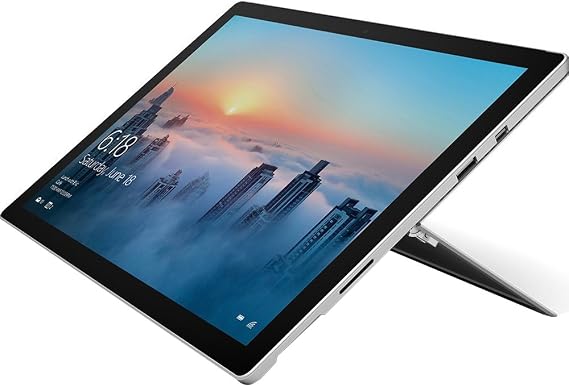
Microsoft Surface Pro 4 (Intel Core M, 4GB RAM, 128GB) with Windows 10 Anniversary Update
77% of respondents would recommend this to a friend
Item #:
2414006
USD 487
Price Details
Excluding Shipping & Custom charges ( Shipping and custom charges will be calculated on checkout )
*All items will import from US
0 ratings
Write a review
In stock
 Imported from USA store
QTY:
Order now and get it around Saturday, October 10
Secured transaction
Ubuy works hard to protect your security and privacy. Our advanced payment security system ensures confidentiality by encrypting your information during transmission using AES (Advanced Encryption Standards) and SSL (Secure Socket Layer) protocols. Your payment details are 100% secure as we do not share your payment details with third party sellers.
Our Top Logistics Partners


Surface Pro 4 is ultrathin, fast, and versatile, the perfect balance of portability and power.

Fast
Shipping

Free
Return*

Secure Packaging

100% Original Products

PCI DSS Compliance

ISO 27001 Certified



Note: Step 1 Voltage Transformer required for using electronics products of US store (110-120). Recommended power converters Buy Now.


What Stands Out
Portable Design
The Surface Pro 4 combines the versatility of a tablet with the performance of a laptop, making it an ideal portable device for on-the-go professionals and students.
High Performance
Equipped with Intel Core M and 128GB storage, this device delivers efficient performance for multitasking and productivity without overheating or noise, setting it apart in the 2-in-1 market.
Windows Experience
Running on Windows 10 Anniversary Update, it offers a seamless and familiar user experience, ensuring compatibility with a wide range of applications and enhancing productivity features.
Product Details
- 6th generation Intel Core M processor, 128 GB storage, and 4 GB RAM
- 12.3-inch Pixel Sense Display with touch and Surface Pen support
- Windows Ink for natural note-taking, Windows Hello for password-free sign-in
- Comprehensive Windows security features for the supported lifetime of the device
- Runs professional-grade software like Adobe Creative Cloud, AutoCAD, and more
- Maximum Memory Capacity: 4
| Brand | Microsoft |
| Model Name | Microsoft Surface Pro 4 (Intel Core M, 4GB RAM, 128GB) with Windows 10 |
| Generation | 6th Generation |
| Model Year | 2017 |
| Age Range Description | Adult |
| Included Components | Power Supply, Quick Start Guide, Safety and warranty guide, Surface Pro 4 |
| Model Number | FML-00001 |
| Specific Uses For Product | personal, gaming, business |
| UPC | 889842191608 |
| Number of Items | 1 |
| Style Name | Device only |
| Manufacturer | Microsoft |
| Number of Packs | 1 |
| Configuration | Intel Core M, 4GB RAM, 128GB |
| Unit Count | 1 Count |
| Size | Intel Core M, 4GB RAM, 128GB |
| Model Series | Surface Pro 4 |
| Global Trade Identification Number | 00889842191608 |
| Item Type Name | Microsoft Surface Pro 4 (Intel Core M, 4GB RAM, 128GB) with Windows 10 Anniversary Update (FML-00001) |
| Mfr Part Number | FML-00001 |
| Hardware Interface | Bluetooth, Bluetooth 4.0, MicroSD, USB 3.0 |
| Wireless Technology | Bluetooth |
| Total Usb Ports | 2 |
| Connectivity Technology | USB |
| Wireless Compability | 802.11b, 802.11g, 802.11n |
| Video Capture Resolution | HD 720p |
| Camera Description | Front, Rear |
| Rear Facing Camera Photo Sensor Resolution | 5 tmp |
| Photo Sensor Resolution | 5 tmp |
| Operating System | Windows 10 |
| Video Processor | Intel |
| Item Weight | 1.7 pounds (770 grams) |
| Graphics Coprocessor | Intel HD Graphics 515 |
| Human-Interface Input | Touchscreen with Stylus Support |
| Graphics Description | Integrated |
| Compatible Devices | Surface Pen, Power Supply |
| Operating System Family | Windows |
| Screen Size | 12.3 inches |
| Display Resolution Maximum | 2736 x 1824, 267 PPI pixels |
| Display Type | LCD |
| Native Resolution | 2736x1824 |
| Aspect Ratio | 16:9 |
| Memory Storage Capacity | 128 GB |
| RAM Memory Installed | 4 GB |
| Memory Slots Available | 1 |
| RAM Size | 4 GB |
| Hard-Drive Size | 128 GB |
| Battery Average Life | 9 hours |
| Battery Capacity | 39.5 watt-hours |
| Battery Cell Type | Lithium Ion |
| Lithium-Battery Energy Content | 39.5 watt-hours |
| Processor Speed | 2.2 GHz |
| Processor Description | 6th Gen Intelu00ae Coreu2122 m3-6Y30 with Intelu00ae HD graphics 515 |
| Processor Brand | Intel |
| CPU Model Number | Core M |
| CPU Model Speed Maximum | 2.2 GHz |
| Other Special Features of the Product | Windows Ink, PixelSense Display |
| Biometric Security Feature | Windows Hello |
| Country of Origin | This item will be imported from US |
| Date First Available | April 12, 2021 |
Who Should Buy?

-
Students
Ideal for students needing a lightweight device for taking notes, studying, and completing assignments on-the-go.
-
Casual Users
Perfect for users who browse the web, check emails, and use productivity apps without heavy multitasking needs.
-
Artists
Great for artists using design software and drawing applications due to its touchscreen and Surface Pen compatibility.

-
Gamers
Not suitable for gaming enthusiasts as it lacks the necessary graphics performance for modern gaming demands.
Product Description
Microsoft Surface Pro 4 (Intel Core M, 4GB RAM, 128GB) with Windows 10 Anniversary Update
Have any Query? Chat with us
Customer Questions & Answers
-
Question:
What are the key features of the Microsoft Surface Pro 4?
Answer: The Microsoft Surface Pro 4 boasts a powerful Intel Core M processor paired with 4GB of RAM, ensuring smooth multitasking and efficiency for diverse tasks. Its 12.3-inch PixelSense display offers stunning clarity and vibrant colors, perfect for both productivity and entertainment. Additionally, Windows 10 Anniversary Update enhances user experience with its refined interface and new features. This device is ideal for professionals who need a reliable tablet-laptop hybrid solution for work, students who require a portable workstation, and creatives looking for a versatile device for sketching and design. -
Question:
Can the Surface Pro 4 handle basic gaming?
Answer: While the Surface Pro 4 isn't primarily designed for gaming, it can handle light gaming quite well. The integrated Intel HD Graphics enables the device to run less demanding games smoothly. Titles like 'Stardew Valley' or 'Undertale' are perfectly playable, making it fun for casual gamers. For more extensive gaming experiences, especially on demanding 3D titles, consider supplementing your gaming with devices designed specifically for that purpose. -
Question:
Is the Surface Pro 4 suitable for graphic design and video editing?
Answer: Yes, the Surface Pro 4 is quite suitable for graphic design and some light video editing. Its sharp display and good processing power can run design software like Adobe Photoshop or Illustrator with ease. However, for intensive video editing tasks, the limited RAM might restrict performance. Designers and video editors can use it for on-the-go work, enjoying the convenience of a stylus for precision and a touch screen for easy navigation. -
Question:
What accessories are recommended for the Surface Pro 4?
Answer: To maximize your experience with the Surface Pro 4, consider adding a Surface Pen for precision input and a Type Cover keyboard for efficient typing. The Pen is perfect for note-taking and creative work, while the keyboard enhances productivity for writing and office tasks. Additionally, a Surface Dock can expand connectivity options, providing extra USB ports, HDMI, and Ethernet for more extensive setups, especially useful in a professional environment. -
Question:
How does the battery life of the Surface Pro 4 perform?
Answer: The Surface Pro 4 offers impressive battery life, capable of lasting up to 9 hours under typical use, such as web browsing and document editing. This endurance makes it ideal for professionals who are frequently on the go or students attending classes throughout the day. However, battery life can vary based on usage, so for extensive tasks like video rendering or gaming, you might notice a bit of a decline. Nonetheless, its performance is robust for everyday applications. -
Question:
Does the Surface Pro 4 support expandability options?
Answer: The Surface Pro 4 does not offer expandable storage options as it comes with either 128GB or higher storage configurations. However, it does support external drives, allowing users to easily increase their storage through USB or MicroSD cards. This makes it versatile for users who require additional space for media files, applications, or creative projects, ensuring that you can maintain optimal performance without worrying about limited internal storage. -
Question:
What kind of software can I run on the Surface Pro 4?
Answer: The Surface Pro 4 runs Windows 10, allowing it to support a wide range of software applications. Users can seamlessly run productivity tools like Microsoft Office Suite, creative applications like Adobe Creative Cloud, and even development environments for coding. This versatility makes it suitable for both professionals and students, offering an all-in-one solution for task management, design work, and even programming assignments. -
Question:
Is the Surface Pro 4 used for educational purposes?
Answer: Absolutely, the Surface Pro 4 is widely used in educational settings due to its versatility and functionality. Students can utilize it for note-taking, research, and engaging with digital content. The ability to use a stylus makes it ideal for drawing diagrams or annotating lecture materials. Its portability allows learners to easily carry it between classes, making it a perfect companion for academic life and study sessions. -
Question:
What is the display quality of the Surface Pro 4?
Answer: The Surface Pro 4 features a 12.3-inch PixelSense display with a resolution of 2736 x 1824, providing stunning visuals with high levels of detail and color accuracy. Whether you're watching videos, viewing photos, or working on detailed graphic designs, the display's vibrant colors and sharp contrasts enhance your experience. This makes it especially appealing for users who prioritize screen quality for both professional and personal use. -
Question:
Where can I buy Microsoft Surface Pro 4 Intel Core M, 4GB RAM, 128GB with Windows 10 Anniversary Update in Turks and Caicos?
Answer: You can purchase the Microsoft Surface Pro 4 Intel Core M, 4GB RAM, 128GB with Windows 10 Anniversary Update from Ubuy. They offer a variety of options for this device, ensuring that you find the perfect fit for your needs. Ubuy is known for providing a straightforward shopping experience, allowing you to quickly locate the product and complete your purchase with confidence.
Microsoft Tablets Core M Editorial Review
Microsoft Surface Pro 4 (Intel Core M, 4GB RAM, 128GB) with Windows 10 Anniversary Update offers a versatile experience as a tablet and laptop hybrid. Users appreciate its lightweight design, making it an excellent choice for students who need to move between classes, while the touchscreen supports stylus input for handwritten notes in apps like OneNote. Battery life reaches up to 9 hours, which is ideal for long days on campus. However, some reviewers have reported glitches, particularly concerning Windows 10 updates and connectivity issues. Overall, it’s a solid device with room for stability improvements, balancing user satisfaction with performance concerns.
Customer Reviews & Ratings
1 customers ratings
-
5 Star
100%
-
4 Star
0%
-
3 Star
0%
-
2 Star
0%
-
1 Star
0%
Review this product
Share your thoughts with other customers
Pros
- Lightweight design ideal for students
- Long battery life for daily use
- Touchscreen with stylus support
- Great for note-taking and studying
- Flexible usage as tablet or laptop
Cons
- Software glitches can be frustrating occasionally
Platform Trust & Buyer Confidence

JK
Jasmin
Verified buyer
“Great products and very good service: very easy and very fast international delivery.”
9 September 2026 · via Trustpilot
AG
Anke
Verified buyer
“Wonderful online shopping experience, smooth transaction from the start. Payment method works conveniently and delivery is unexpectedly fast and reliable. You go the extra mile for service. What makes this even more amazing, you deliver to Namibia. I will remain a happy Ubuy customer and will increase my purchases for sure! Thank you!”
10 September 2026 · via Trustpilot
H
Hazel
Verified buyer
“Very easy to find the products what you need, and so fast delivery, that’s why I highly recommended to others costumers to used ubuy.”
10 September 2026 · via Trustpilot
O
Opaleye
Verified buyer
“I received exactly what I ordered I was skeptical about your site because that was my first time to order. But the order came timely and neatly packaged. I was not disappointed. Thank you.”
11 September 2026 · via Trustpilot
AC
Adele
Verified buyer
“Easy to find and order what you want on the website. Delivery is quick to the UK”
8 September 2026 · via Trustpilot
Secure Checkout
Global Delivery
Easy Returns
Genuine Products
Product Price History
Important information
- Limitations : For products shipped internationally, please note that any manufacturer warranty may not be valid; manufacturer service options may not be available; product manuals, instructions, and safety warnings may not be in destination country languages; the products (and accompanying materials) may not be designed in accordance with destination country standards, specifications, and labeling requirements; and the products may not conform to destination country voltage and other electrical standards (requiring use of an adapter or converter if appropriate). The recipient is responsible for assuring that the product can be lawfully imported to the destination country. When ordering from Ubuy or its affiliates, the recipient is the importer of record and must comply with all laws and regulations of the destination country.
- Not all the products listed on Ubuy are for sale, as Ubuy is a global search engine. Products are subject to export/trade regulations.
USD 487
Order now and get it around Saturday, October 10
This item is not restrict in my country.(Please click on above link if this item is not restrict in your country, So our team will review and allow.)
QTY:
Secured transaction
PCI DSS compliant and ISO 27001:2022 certified, with encrypted payments and full buyer protection on every order.
Our Top Logistics Partners
Fastest cross-border delivery
Features & Benefits
- 6th generation Intel Core M processor, 128 GB storage
- 9 hours of video playback
- Windows Ink to capture notes quickly
- Windows Hello for password-free login
- Runs professional-grade software perfectly
- Comprehensive security with Windows 10 Pro
Ubuy Assurance
Experience worry-free shopping with 100% original products, PCI DSS-compliant payment security, ISO 27001-certified data protection, the fastest cross-border delivery, free returns *, and secure packaging on every order.