0 ratings

Item #:
77185049
FHD Replacement for HP Envy X360 15-EW 15T-EW 15-EW0013DX 15-EW0023DX 15-EW0797NR 15-ew1073cl 15T-EW000 15T-EW100 15-ew0000 15-ew0 15-EW1057NR
Item #:
77185049
USD 145
Price Details
Excluding Shipping & Custom charges ( Shipping and custom charges will be calculated on checkout )
*All items will import from US
0 ratings
Write a review
In stock
 Imported from USA store
QTY:
Order now and get it around Monday, June 29
Secured transaction
Ubuy works hard to protect your security and privacy. Our advanced payment security system ensures confidentiality by encrypting your information during transmission using AES (Advanced Encryption Standards) and SSL (Secure Socket Layer) protocols. Your payment details are 100% secure as we do not share your payment details with third party sellers.
Our Top Logistics Partners


Brand-new & High quality LCD Display Screen

Fast
Shipping

Free
Return*

Secure Packaging

100% Original Products

PCI DSS Compliance

ISO 27001 Certified


Note: Step 1 Voltage Transformer required for using electronics products of US store (110-120). Recommended power converters Buy Now.


What Stands Out
High-Resolution Display
Enjoy stunning visuals with a 1920x1080 IPS LCD screen, enhancing clarity and brightness for all your tasks, from work to entertainment.
Stylus Compatibility
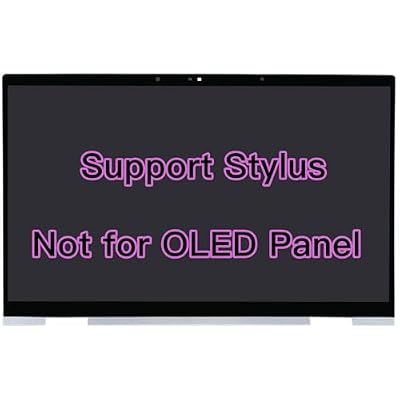
Designed specifically for HP Envy X360 models, this replacement assembly supports stylus use, offering precision and flexibility for note-taking, drawing, and design tasks.
Seamless Replacement
Easily replace your damaged or unresponsive screen with this touch assembly, restoring your device's functionality and performance conveniently and effectively.
Product Details
| Item Weight | 3 lbs (1.36 kg) |
Who Should Buy?

-
Students
Ideal for students who need precise touch input for note-taking and digital drawings on their HP Envy X360.
-
Professionals
Great for professionals requiring a reliable touch screen for presentations, design work, or meeting notes.
-
Artists
Perfect for digital artists looking for an efficient stylus that enhances their creative capabilities on touchscreen displays.

-
Casual Users
Casual users who primarily use laptops for web browsing or word processing may not need a stylus.
-
Gamers
Not suitable for gamers who typically rely on a mouse or controller for better response and accuracy.
-
Non-Touchscreen Devices
Incompatible with devices that do not possess touchscreen features, making it unnecessary for those users.
Product Description
FHD Replacement for HP Envy X360 15-EW 15T-EW 15-EW0013DX 15-EW0023DX 15-EW0797NR 15-ew1073cl 15T-EW000 15T-EW100 15-ew0000 15-ew0 15-EW1057NR 15-EW0504NA N10353-001 N40697-001 LCD Touch Screen
Have any Query? Chat with us
Customer Questions & Answers
-
Question:
What models are compatible with the LCD Touch Screen Replacement L53545-001 L64480-001?
Answer: The LCD Touch Screen Replacement L53545-001 L64480-001 is specifically designed for the HP models 15M-DR1011DX, 15M-DR1012DX, 15M-DR0011DX, 15M-DR0012DX, 15-DR0003CA, 15-DR0008CA, and 15-DR0090CA. This compatibility ensures that you can seamlessly replace the damaged screen on your HP laptop without needing any additional modifications. Whether you're using your laptop for work, gaming, or multimedia, a perfect fit is crucial for maintaining display quality and function. -
Question:
How do I know if I need to replace my LCD touch screen?
Answer: Signs that you may need to replace your LCD touch screen include cracks, unresponsive areas, discoloration, or flickering. If the touchscreen functionality is impaired or if your display is completely black while the laptop is on, these are clear indicators. Replacing your screen can restore usability and enhance visual experience. If you're experiencing performance issues due to a damaged screen, opting for a replacement can improve productivity and make everyday tasks more enjoyable. -
Question:
Can I install the LCD replacement myself, or do I need a professional?
Answer: While it's possible to install the LCD replacement yourself if you have basic tech skills and tools, hiring a professional is recommended for optimal results. DIY installation requires careful handling and knowledge of laptop components to avoid further damage. If you choose the DIY route, be sure to follow a detailed guide or video tutorial specific to your HP model to ensure a reliable installation. On the other hand, a professional service can provide a faster solution, ensuring all connectors and components are properly handled. -
Question:
What tools do I need to replace the LCD touch screen?
Answer: To replace the LCD touch screen, you will typically need a screwdriver set (often Phillips), a plastic spudger tool, tweezers, and an anti-static wrist strap. Having these tools on hand ensures that you can carefully open the laptop casing without damaging other components. Proper tools allow for a hassle-free repair process and reduce the likelihood of scratching or damaging parts during installation. Gather your tools and refer to a step-by-step guide, which will facilitate the replacement process. -
Question:
What should I do if my touchscreen is not responding after replacement?
Answer: If your touchscreen is unresponsive after replacement, verify that all cables are securely reconnected and check for any physical damage to the connectors. Additionally, ensuring that the laptop’s software is updated can often resolve touch screen issues. Sometimes, performing a simple restart or calibrating the touchscreen through settings can restore functionality as well. If the problem persists, it may indicate a need for professional service to diagnose deeper issues beyond screen replacement. -
Question:
Is the LCD touch screen replacement part original or aftermarket?
Answer: The LCD Touch Screen Replacement L53545-001 L64480-001 can come in both original and aftermarket options, depending on where it’s purchased from. Original parts are made by the manufacturer and ensure perfect compatibility. Aftermarket parts can be less expensive and may offer similar functionality, but can vary in quality. Always check the product description to confirm whether the part is original or aftermarket to ensure the best match for durability and performance in your HP laptop. -
Question:
What if my laptop screen is displaying vertical lines?
Answer: If your laptop screen is displaying vertical lines, it often indicates a hardware issue either with the screen itself or the cable connections. A screen replacement may resolve this issue if it is due to screen damage. However, if the lines persist after replacement, it may be related to the graphics card or internal connections. In such cases, running diagnostics or consulting a professional could help identify the underlying cause and determine the best course of action. -
Question:
Where can I buy LCD Touch Screen Replacement L53545-001 L64480-001 for HP in Turks and Caicos?
Answer: You can purchase the LCD Touch Screen Replacement L53545-001 L64480-001 for HP from Ubuy in Turks and Caicos. Ubuy is an excellent destination for electronics parts and replacements, providing a wide range of products tailored to your needs. Their user-friendly platform and reliable customer service make it easy to find and order the right components for your laptop. Check Ubuy’s website for availability and get started on your replacement journey today! -
Question:
What influences the prices of LCD touch screen replacements?
Answer: The prices of LCD touch screen replacements can be influenced by various factors including the brand, OEM vs. aftermarket status, size, and new vs. refurbished condition. Brands that provide original equipment manufacturer (OEM) parts often command higher prices due to guaranteed compatibility and quality. Additionally, market supply and demand can affect pricing throughout the year, and sometimes seasonal sales could present opportunities to find great deals. Being informed about these factors can help you make a better purchasing decision. -
Question:
Are there any precautions to take before replacing the screen?
Answer: Before replacing your LCD touch screen, ensure to back up important data to prevent any loss during the repair process. It's also crucial to work in a clean environment to avoid dust accumulation inside the laptop, which can affect performance. Additionally, grounding yourself to discharge any static electricity can help protect sensitive components from damage. Following these precautions can ensure a smoother replacement process and maintain your laptop’s longevity.
FirstLCD Replacement Screens Editorial Review
The FirstLCD Support Stylus Replacement for HP Envy X360 received positive reviews and praise for its quality and functionality. One user mentioned that it was a bit tricky at first to connect the cables properly, but after a few attempts, they got it working. While a slight gripe was expressed about the absence of the HP logo on the bottom center, the overall Consensus was that it's a 5-star product, with the touch screen and all features working seamlessly after installation. Another user appreciated the well-packaged delivery and found the installation process relatively easy after watching a video, with the touchscreen, mouse, and display working perfectly. They also highlighted the product's great quality and the value for money compared to other sellers. One customer who had previously purchased a screen from a different seller noted that this replacement screen provided much better quality, resembling an OEM screen with good contrast, brightness, and viewing angles. Additionally, a user expressed their satisfaction in saving a significant amount of money, as the product worked perfectly to replace their cracked screen, describing it as exactly as described. Overall, the feedback on the product was very positive, with customers highlighting its quality, functionality, and value for money.
Customer Reviews & Ratings
1 customers ratings
-
5 Star
100%
-
4 Star
0%
-
3 Star
0%
-
2 Star
0%
-
1 Star
0%
Review this product
Share your thoughts with other customers
Pros
- High-quality screen with good contrast, brightness, and viewing angles
- Easy installation process with touchscreen, mouse, and display working seamlessly
- Considered as good as an OEM screen
Cons
- Tricky initial cable connection for some users
Product Price History
Important information
- Limitations : For products shipped internationally, please note that any manufacturer warranty may not be valid; manufacturer service options may not be available; product manuals, instructions, and safety warnings may not be in destination country languages; the products (and accompanying materials) may not be designed in accordance with destination country standards, specifications, and labeling requirements; and the products may not conform to destination country voltage and other electrical standards (requiring use of an adapter or converter if appropriate). The recipient is responsible for assuring that the product can be lawfully imported to the destination country. When ordering from Ubuy or its affiliates, the recipient is the importer of record and must comply with all laws and regulations of the destination country.
- Not all the products listed on Ubuy are for sale, as Ubuy is a global search engine. Products are subject to export/trade regulations.
USD 145
Order now and get it around Monday, June 29
This item is not restrict in my country.(Please click on above link if this item is not restrict in your country, So our team will review and allow.)
QTY:
Secured transaction
Ubuy works hard to protect your security and privacy. Our advanced payment security system ensures confidentiality by encrypting your information during transmission using AES (Advanced Encryption Standards) and SSL (Secure Socket Layer) protocols. Your payment details are 100% secure as we do not share your payment details with third party sellers.
Our Top Logistics Partners
Fastest cross-border delivery
Features & Benefits
- Brand-new & High quality LCD Display Screen
- 15.6 inch screen size
- Maximum resolution of 1920*1080
- Compatible for HP Envy X360 15-EW 15T-EW Series(P/N: N10353-001)
- Supports Stylus
- Check laptop model carefully to avoid buying wrong