0 ratings







Item #:
135086038
USB C Docking Station Triple Monitor, Laptop Docking Station with Dual 4K@60Hz HDMI, 4K@60Hz DP, 8 USB A/C Ports, 1000Mbps Ethernet, SD/TF Card Slot,
82% of respondents would recommend this to a friend
Item #:
135086038
USD 140
Price Details
Excluding Shipping & Custom charges ( Shipping and custom charges will be calculated on checkout )
*All items will import from US
0 ratings
Write a review
In stock
 Imported from USA store
QTY:
Order now and get it around Wednesday, June 24
Secured transaction
Ubuy works hard to protect your security and privacy. Our advanced payment security system ensures confidentiality by encrypting your information during transmission using AES (Advanced Encryption Standards) and SSL (Secure Socket Layer) protocols. Your payment details are 100% secure as we do not share your payment details with third party sellers.
Our Top Logistics Partners


Unlock the full potential of your laptop with our USB C Docking Station featuring triple monitor support and lightning-fast data transfer.

Fast
Shipping

Free
Return*

Secure Packaging

100% Original Products

PCI DSS Compliance

ISO 27001 Certified


Note: Step 1 Voltage Transformer required for using electronics products of US store (110-120). Recommended power converters Buy Now.


What Stands Out
Triple Monitor Support
Seamlessly connect up to three displays with dual 4K HDMI and DisplayPort outputs, enhancing your multitasking capabilities and providing a broader workspace for improved productivity.
Multiple Connectivity Options
Equipped with eight USB A/C ports and high-speed Ethernet, this docking station ensures versatile connectivity for all your devices, facilitating smoother data transfers and secure internet connections.
Powerful Performance
Includes a 100W AC power adapter that powers your laptop while simultaneously supporting all connected devices, eliminating the need for multiple chargers and streamlining your workspace.
Product Details
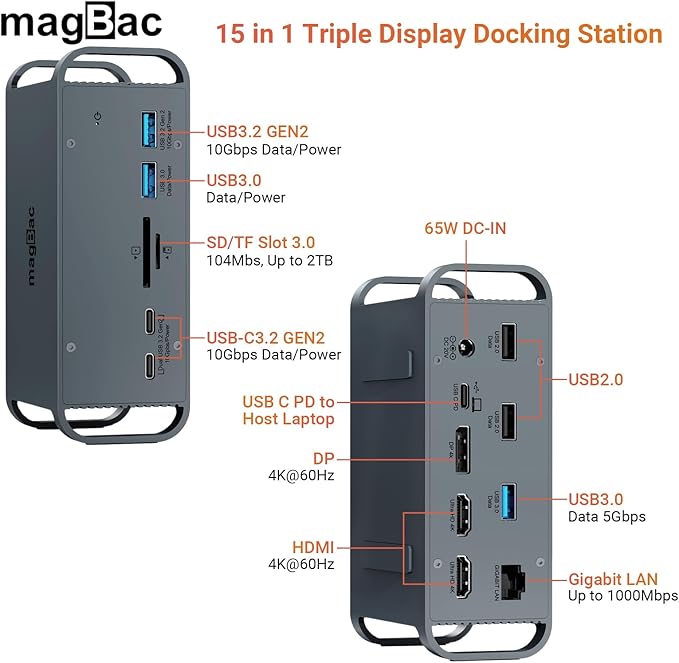
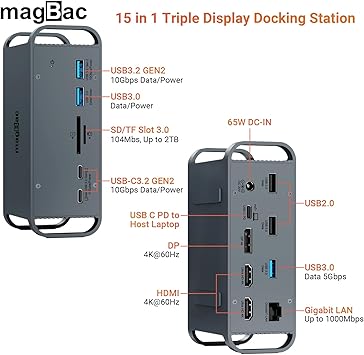
- USB C DOCKING STATION: The docking station integrates 15 ports, including: USB A 2.0*2, USB A 3.0*2, USB A 3.1*1, USB C 3.1*2, USB C for host laptop*1, 4K@60Hz HDMI port*2, 4K@60Hz DP port*1, 1000Mbps enternet port*1, SD/TF card slot, 100w DC-IN port. Our docking station has most of the ports you normally use, but having a full-featured Type-C port on your laptop is key to experiencing all of the features, so check the protocols supported by your laptop's Type-C port before purchasing.
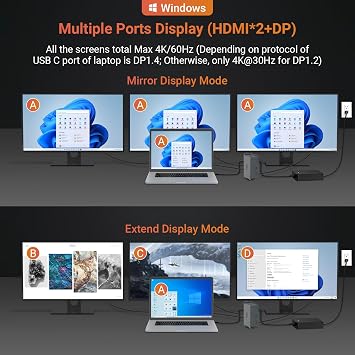
- MULTI MONITOR EXPANSION: The laptop docking station has 3 display ports--2 HDMI and 1 DP. So you can connect three additional monitors to your laptop. And When you connect two additional monitors, each monitor is up to 4K@30Hz, the resolving power is up to 2K@60Hz when connect three monitors. It is worth noting that there are two extension modes here - Mirror Mode (A-A+A+A) and Extend Mode (A-B+C+D/A-B+B+B) . Windows can use the mirror mode and A-BCD extend mode, while Mac OS's extend mode is A-B+B+B.
- SUPERSPEED DATA TRANSFER: 10GbpsUSB A and 10Gbps USB C data ports on the front of the usb c dock. Their super-speed data transfer is ideal for drive and HDD devices, the time required to transfer a 20G file just needs 16s! And together with the SD/TF card slots, you can transfer data between devices at some fast speeds! In addition, the docking station dual monitor also offers 2 USB 2.0 ports to connect your wireless keyboard and mouse without any lag.
- GIGABIT ETHERNET & 100W POWER ADAPTER: Gigabit Ethernet RJ45 port ensures a rapid and reliable network connection (backward compatible with 1000/100/10Mbps). Included an independent 100W AC power adapter for dock unit, all the ports on the dock share a maximum power supply of 100W ensuring safe and stable performance during operating. The dock has silicone mats on the both sides, so you can place it either vertically or horizontally.
| Hardware Interface | USB Type C |
| Additional Features | Fast Charging, Plug and Play |
| Compatible Devices | Laptops with USB-C or Thunderbolt 3/4/5 ports, including models from brands such as HP, Dell, Lenovo, and others. |
| Total Usb Ports | 8 |
| Data Transfer Rate | 10 Gigabits Per Second |
| Number of Ports | 15 |
| Operating System | Windows, macOS |
| Color | grey |
| Enclosure Material | Silicone |
| Brand | i-magBac |
| Manufacturer | magBac |
| Model Number | DS-P06SD |
| Item Dimensions L x W x H | 5.55"L x 1.93"W x 2.99"H (14.1 x 4.9 x 7.6 cm) |
| Special Feature | Fast Charging, Plug and Play |
| Compatible Devices | Laptops with USB-C or Thunderbolt 3/4/5 ports, including models from brands such as HP, Dell, Lenovo, and others. See more |
Who Should Buy?

-
Multimedia Professionals
Ideal for video editors and graphic designers who require multiple displays and high-resolution outputs for detailed work.
-
Remote Workers
Great for remote employees needing a versatile setup with multiple connectivity options for seamless file sharing and collaboration.
-
Gaming Enthusiasts
Perfect for gamers wanting to expand their display setup, supporting high-resolution HDMI for an immersive gaming experience.

-
Casual Users
Not suitable for basic users who only need a simple connection without the need for multiple ports or monitors.
-
Traveling Professionals
Less ideal for users frequently on the move due to its bulkiness, making it less portable than smaller docking solutions.
-
Budget-Conscious Buyers
May not fit those looking for affordable options as its advanced features come at a higher price point.
Product Description
Have any Query? Chat with us
Customer Questions & Answers
-
Question:
What is a USB C Docking Station?
Answer: A USB C Docking Station is a versatile device that expands the connectivity options of your laptop. It allows you to connect multiple peripherals like monitors, USB devices, and networks using a single USB C port. This type of docking station is particularly useful for enhancing productivity by enabling a multi-monitor setup, such as dual 4K@60Hz displays, and facilitating data transfer through various USB A/C ports. Whether you're a professional needing extensive workspace or a creative requiring high-resolution displays, a docking station can streamline your office setup. -
Question:
How many monitors can I connect with this docking station?
Answer: This docking station supports a triple monitor setup, allowing you to connect up to three displays simultaneously. It features dual 4K@60Hz HDMI and a 4K@60Hz DisplayPort, providing high resolution for each monitor. This capability is particularly beneficial for multitaskers or professionals in fields like graphic design or data analysis, where having multiple screens can enhance workflow and efficiency. With the right configuration, you can expand your workspace significantly, improve visibility, and manage several applications simultaneously. -
Question:
What types of devices are compatible with this docking station?
Answer: The USB C Docking Station is compatible with a wide range of devices, including laptops, tablets, and smartphones that support USB C connections. This includes a variety of brands and models, making it a versatile addition to your tech arsenal. It's an ideal solution for users who frequently switch between devices or need to connect multiple peripherals. The high-speed connectivity and multiple ports make it suitable for both work and entertainment environments, such as connecting to external monitors for presentations or gaming. -
Question:
What benefits does the 1000Mbps Ethernet port provide?
Answer: The 1000Mbps Ethernet port enables a stable and high-speed internet connection, significantly outperforming standard Wi-Fi connections. This is particularly advantageous for tasks that require reliable internet, such as video conferencing, online gaming, or large file transfers. By connecting directly via Ethernet, users can experience reduced latency and increased bandwidth, which is crucial for uninterrupted productivity. For users in environments where Wi-Fi may be inconsistent, this feature ensures a fast and dependable internet connection. -
Question:
Can I use this docking station for data transfer?
Answer: Yes, this docking station supports data transfer through its multiple USB A/C ports. You can connect external hard drives, flash drives, and other peripherals, facilitating quick and efficient data management. This is especially useful for professionals who need to transfer large files or back up important data on-the-go. The combination of high-speed ports allows for fast data transfer rates, which can significantly improve work efficiency in environments that involve substantial data handling. -
Question:
What is the purpose of the SD/TF card slot?
Answer: The SD/TF card slot provides the capability to read and write data from memory cards, making it ideal for photographers, videographers, and creatives who need quick access to their media files. This feature allows users to conveniently offload photos or videos from their devices without the need for additional card readers. It enhances workflow efficiency, as users can manage and transfer files seamlessly through the docking station, thereby keeping their workspace organized. -
Question:
Is it possible to charge my laptop with this docking station?
Answer: Yes, many USB C Docking Stations come equipped with Power Delivery (PD) technology, allowing you to charge your laptop while using the docking station. The docking station can supply power to your laptop, eliminating the need for separate chargers. This feature is particularly useful for users who are frequently on the move, as it simplifies connectivity and power management with one single device. Make sure your docking station supports PD to ensure optimal charging performance. -
Question:
Can I use the docking station with a MacBook?
Answer: Absolutely! The USB C Docking Station is fully compatible with MacBook models equipped with USB C ports. Users can connect multiple external monitors, USB devices, and internet sources effortlessly, enhancing their overall productivity. By taking advantage of the high-resolution output and fast data transfer capabilities, MacBook users can create a powerful workstation that suits their professional or personal needs. -
Question:
How do I set up the docking station?
Answer: Setting up the docking station is straightforward. Simply connect it to a power source (if required), plug the USB C cable into your laptop, and then connect any additional peripherals or monitors via their respective ports. Most operating systems will automatically recognize the devices connected, allowing you to extend or duplicate your display. This user-friendly setup makes it an efficient solution for anyone looking to enhance their workstation with minimal effort. -
Question:
Where can I buy USB C Docking Station Triple Monitor?
Answer: You can purchase the USB C Docking Station Triple Monitor from Ubuy in Turks and Caicos. Ubuy offers a wide range of electronic products, ensuring you can find the right docking station to enhance your workspace. With a user-friendly interface and an extensive selection of tech accessories, Ubuy is a reliable option for acquiring your USB C Docking Station and ensuring a smooth shopping experience.
i-magBac Docking Stations DS-P06SD Editorial Review


** USB C Docking Station** The USB C Docking Station offers a sleek and modern design that appeals to both aesthetics and functionality, resembling a miniaturized version of the classic Mac Pro. Users commend its sturdy aluminum casing and compact size, making it a practical addition to any desk setup or a portable accessory for travel. With a multitude of ports—including dual 4K HDMI, DisplayPort, and several USB-A and USB-C connections—it effectively facilitates multitasking by allowing users to easily connect multiple devices, such as laptops, monitors, and external drives. While many users appreciate the docking station’s performance, there have been a handful of reports indicating sporadic issues with the recognition of external displays and difficulty saving files on external SSDs. Despite these complaints, several reviewers highlight the docking station’s versatility and compatibility, especially with Apple devices, stating that it efficiently turns laptops into full desktop setups. Overall, this docking station garners positive feedback for its design and array of features. However, potential buyers should be mindful of its limitations, particularly concerning certain compatibility issues and the absence of USB A adapters, which some users found inconvenient. That said, for those looking for a reliable and aesthetic solution to expand connectivity, this USB C Docking Station appears to be a worthy investment. **
Customer Reviews & Ratings
11 customers ratings
-
5 Star
50%
-
4 Star
0%
-
3 Star
13%
-
2 Star
25%
-
1 Star
12%
Review this product
Share your thoughts with other customers
Pros
- Sleek and sturdy aluminum design
- Wide range of connectivity options (multiple HDMI, DisplayPort, USB-A, and USB-C)
- Compact and travel-friendly
- Reliable performance for most connections
- Good for turning laptops into versatile desktop setups
Cons
- Difficulty saving files on some external SSDs
Product Price History
Important information
- Limitations : For products shipped internationally, please note that any manufacturer warranty may not be valid; manufacturer service options may not be available; product manuals, instructions, and safety warnings may not be in destination country languages; the products (and accompanying materials) may not be designed in accordance with destination country standards, specifications, and labeling requirements; and the products may not conform to destination country voltage and other electrical standards (requiring use of an adapter or converter if appropriate). The recipient is responsible for assuring that the product can be lawfully imported to the destination country. When ordering from Ubuy or its affiliates, the recipient is the importer of record and must comply with all laws and regulations of the destination country.
- Not all the products listed on Ubuy are for sale, as Ubuy is a global search engine. Products are subject to export/trade regulations.
USD 140
Order now and get it around Wednesday, June 24
This item is not restrict in my country.(Please click on above link if this item is not restrict in your country, So our team will review and allow.)
QTY:
Secured transaction
Ubuy works hard to protect your security and privacy. Our advanced payment security system ensures confidentiality by encrypting your information during transmission using AES (Advanced Encryption Standards) and SSL (Secure Socket Layer) protocols. Your payment details are 100% secure as we do not share your payment details with third party sellers.
Our Top Logistics Partners
Fastest cross-border delivery
Features & Benefits
- Integrates 15 versatile ports for all your connectivity needs.
- Connect up to three monitors with dual 4K@60Hz support.
- Achieve data transfer speeds of up to 10Gbps for efficient file handling.
- Includes a Gigabit Ethernet port for a stable internet connection.
- Comes with a 100W AC power adapter for reliable performance.
- Compatible with both Windows and Mac OS for maximum versatility.