- Home Page /
- Office Products /
- Office Electronics /
- Other Office Equipment /
- Label Makers /
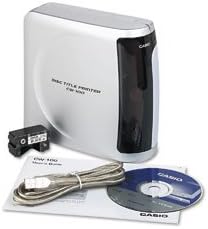
- Casio CW-100 CD Label Printer
0 ratings


Item #:
1826083
Casio CW-100 CD Label Printer
79% of respondents would recommend this to a friend
Item #:
1826083
USD 360
Price Details
Excluding Shipping & Custom charges ( Shipping and custom charges will be calculated on checkout )
*All items will import from US
0 ratings
Write a review
In stock
 Imported from USA store
QTY:
Order now and get it around Tuesday, October 06
Secured transaction
Ubuy works hard to protect your security and privacy. Our advanced payment security system ensures confidentiality by encrypting your information during transmission using AES (Advanced Encryption Standards) and SSL (Secure Socket Layer) protocols. Your payment details are 100% secure as we do not share your payment details with third party sellers.
Our Top Logistics Partners


Creates crisp, clear professional-looking CDs without the hassle of applying labels.

Fast
Shipping

Free
Return*

Secure Packaging

100% Original Products

PCI DSS Compliance

ISO 27001 Certified



Note: Step 1 Voltage Transformer required for using electronics products of US store (110-120). Recommended power converters Buy Now.


What Stands Out
Versatile Labeling
The Casio CW-100 allows users to print custom CD labels and covers, accommodating various media types, enhancing organization and personalization for music lovers and professionals alike.
High-Quality Prints
With superior print resolution, the CW-100 delivers crisp and vibrant label designs, ensuring that every detail stands out, making it perfect for presentations and professional use.
User-Friendly Interface
The intuitive interface and easy-to-use software of the CW-100 simplify the labeling process, enabling users to create and print labels quickly, saving time without compromising on quality.
Product Details
- Prints titles on up to 40 discs in one of 5 different colors (red, blue, green, silver or black)
- Uses direct thermal printing technology which does not damage discs and provides instant drying
- Provides 300 DPI resolution for sharp, professional results
- Offers an auto-turn function to print on upper and lower areas of discs in one operation
- Allows importing of BMP or JPG graphics and the use of TrueType fonts for custom disc titles
- Connects to a PC via USB and offers on-screen preview with up to 6 lines per input field
| Printer Type | Thermal |
| Other Special Features of the Product | CD Printing |
| Printer Output Type | Monochrome |
| Item Weight | 3.7 pounds (1.68 kg) |
| Print media | Labels |
| Compatible Devices | PC |
| Maximum Copies Per Run | 40 |
| Ink Color | red, green, blue, silver, black |
| Additional Printer Functions | Print Only |
| Control Method | App |
| Processor Count | 1 |
| Number of Drivers | 1 |
| Resolution | 300 x 300 |
| Maximum Media Size | 120mm |
| Maximum Sheet Capacity | 40 |
| Maximum print Resolution Color | 300 dots_per_inch |
| Maximum Print Resolution Black and White | 300 dpi |
| Duplex | Simplex |
| Maximum Copy Resolution Color | 300 dpi |
| Maximum Copy Resolution Black and White | 300 dpi |
| Brand | Casio |
| Model Name | CW 100 |
| Model Number | CW-100-IH |
| Built-In Media | AC Adapter, USB Cable, Ink Ribbon Cassette, Practice CD-R, CD-ROM with CD-R Title Printer Application, CD Layout Ruler |
| Series Number | 100 |
| Model Series | CW |
| Specific Uses For Product | CD Label Printing |
| UPC | 999999049025 079767161835 079767168780 |
| Unit Count | 1 Count |
| Global Trade Identification Number | 00079767161835 |
| Manufacturer | #N/A! |
| Color | silver |
| Color Depth | 1 bits_per_pixel |
| Printer Connectivity Type | USB |
| Hardware Interface | USB |
| Total USB 2.0 Ports | 1 |
| Total Usb Ports | 1 |
| Connectivity Technology | USB |
| Printing Technology | Thermal |
| Special Feature | CD Printing |
| Printer Output | Monochrome |
| Included Components | AC Adapter, USB Cable, Ink Ribbon Cassette, Practice CD-R, CD-ROM with CD-R Title Printer Application, CD Layout Ruler See more |
Who Should Buy?

-
Home Users
Ideal for individuals wanting to organize personal media collections with custom labels and designs.
-
Small Businesses
Great for small businesses needing to create professional labels for CDs, DVDs, and promotional materials.
-
Hobbyists
Perfect for craft enthusiasts who enjoy creating unique, personalized labels for various projects.

-
High-Volume Users
Not suitable for those who require frequent, high-volume printing due to relatively slower print speeds.
Product Description
Casio CW-100 CD Label Printer
About This Item
Introducing the Casio CW-100 CD Label Printer, the perfect solution for all your labeling needs. This compact and versatile printer is designed to create professional-quality CD labels with ease. With the Casio CW-100 Label Printer, you can say goodbye to the hassle of handwriting labels or dealing with messy ink cartridges.
This printer uses thermal printing technology, which means that it prints directly onto the labels using heat. This ensures that your labels look crisp, clear, and smudge-free every time. Whether you need to print labels for organizing your CD collection, creating professional presentations, or even customizing gifts, the Casio CW-100 Printer has got you covered. It offers a wide range of label templates and customization options, allowing you to create labels that suit your unique style and needs.
This Casio Label Printer is also incredibly convenient to use. It features a wireless connectivity option, so you can easily send your label designs from your computer or mobile devices. Additionally, its portable design makes it perfect for on-the-go use or for setting up a small labeling station in your workspace. But don't let its compact size fool you - the Casio CW-100 Label Printer is a powerhouse when it comes to performance.
It boasts high-speed printing capabilities, allowing you to print multiple labels in a matter of minutes. Plus, it is built to last, thanks to its durable construction and reliable functionality. In summary, the Casio CW-100 CD Label Printer is the ultimate labeling solution. With its professional-quality prints, versatile features, and user-friendly design, it is the perfect addition to any office, home, or personal workspace.
Say goodbye to messy handwriting and hello to convenience and efficiency with the Casio CW-100 Label Printer.
Have any Query? Chat with us
Customer Questions & Answers
-
Question:
How to Shop Casio CW-100 CD Label Printer Online From Ubuy?
Answer: It’s easy to shop Casio CW-100 CD Label Printer online from Ubuy. You just have to search for the product, choose your shipping method while checking out and get it delivered to your location. -
Question:
Is Casio CW-100 CD Label Printer Available to Shop Online in Turks and Caicos?
Answer: Yes, at Ubuy Turks and Caicos this product is available for you to shop at a reasonable price. The Casio CW-100 CD Label Printer is not available locally but you can trust us with our express shipping services. -
Question:
How Long Does It Take to Get Product After Placing the Order?
Answer: The delivery time of your ordered product varies as per what you've ordered and the shipping method that you've chosen. The estimated delivery time is mentioned during the checkout process, so be carefree while shopping.
Casio Label Makers CW-100-IH Editorial Review
No editorial reviews found
Customer Reviews & Ratings
1 customers ratings
-
5 Star
100%
-
4 Star
0%
-
3 Star
0%
-
2 Star
0%
-
1 Star
0%
Review this product
Share your thoughts with other customers
Product Price History
Important information
- Limitations : For products shipped internationally, please note that any manufacturer warranty may not be valid; manufacturer service options may not be available; product manuals, instructions, and safety warnings may not be in destination country languages; the products (and accompanying materials) may not be designed in accordance with destination country standards, specifications, and labeling requirements; and the products may not conform to destination country voltage and other electrical standards (requiring use of an adapter or converter if appropriate). The recipient is responsible for assuring that the product can be lawfully imported to the destination country. When ordering from Ubuy or its affiliates, the recipient is the importer of record and must comply with all laws and regulations of the destination country.
- Not all the products listed on Ubuy are for sale, as Ubuy is a global search engine. Products are subject to export/trade regulations.
USD 360
Order now and get it around Tuesday, October 06
This item is not restrict in my country.(Please click on above link if this item is not restrict in your country, So our team will review and allow.)
QTY:
Secured transaction
PCI DSS compliant and ISO 27001:2022 certified, with encrypted payments and full buyer protection on every order.
Our Top Logistics Partners
Fastest cross-border delivery
Features & Benefits
- Auto-loading and auto-turn saves time and improves performance
- Utilizes any TrueType fonts available via Mac.
- 300 dpi print resolution.
- Includes USB cable, software, black ink ribbon, CD-R and AC adapter.
- Can print on up to 40 discs in 1 of 5 colors per ribbon cartridge.
- Uses any type of TrueType font.
Ubuy Assurance
Experience worry-free shopping with 100% original products, PCI DSS-compliant payment security, ISO 27001-certified data protection, the fastest cross-border delivery, free returns *, and secure packaging on every order.